
The Small Components Behind the High Performance of SonicWall Connectivity

A Practical Guide to SFP, SFP+, SFP28, QSFP+, and QSFP28 Transceivers
When designing a network, most decisions naturally focus on the big elements: which firewall to deploy, what throughput is required, and how traffic will flow across the infrastructure. At SonicWall, we spend a lot of time helping customers make the right decisions.
But another decision often comes later in the process and yet has a direct impact on how the entire solution performs: how everything connects. This is where transceivers come into play.
A Small Component with a Big Responsibility
SFP, SFP+, SFP28, QSFP+, and QSFP28 modules are often seen as simple accessories. They represent the physical layer that allows firewalls, switches, and servers to communicate with each other.
These modules handle the physical transmission of data. When fiber is used, they convert electrical signals into optical signals and back again. In copper-based connections, such as Twinax (DAC) or RJ45, the signal remains electrical throughout.
This flexibility allows connectivity over both fiber and copper media, depending on the design.
From our perspective, this modularity is essential. It allows a single SonicWall platform to adapt to different environments, from a small branch office to a high-performance data center. The firewall remains the same. The connectivity layer is what adapts.
Why Interface Evolution Matters
As network demands have evolved, so has the role of the firewall. Today's environments are driven by encrypted traffic, cloud applications, and increasingly distributed architectures. Firewalls are no longer inspecting only north-south traffic. They also handle significant east-west flows within data centers and hybrid environments.
To support this, interface speeds have evolved over time. Rather than increasing interface size, the industry has improved efficiency per lane and, when needed, combined multiple lanes into a single module. This allows modern firewall platforms to deliver significantly higher throughput without increasing their physical footprint.
Interface Evolution at a Glance
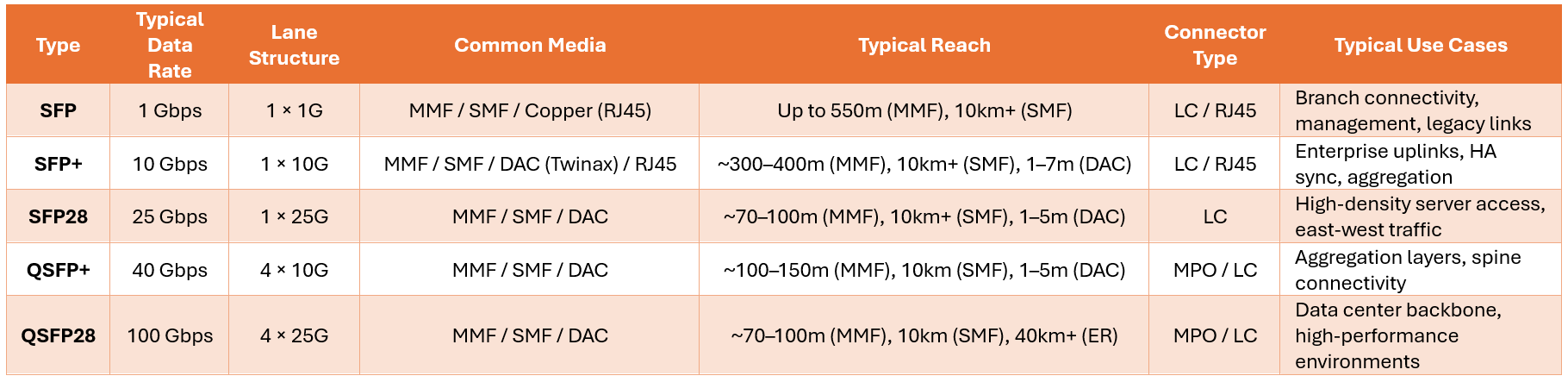
Note: Actual performance and supported configurations depend on the platform, optics variant (SR, LR, ER), and fiber type (e.g., OM3 vs. OM4).
How These Modules Are Used in Real Deployments
Across SonicWall deployments, consistent usage patterns emerge based on environment type.
| Environment | Typical Speed | Common Media | Typical Use Cases |
| Branch Office | 1G (SFP) | RJ45 / MMF / SMF | Secondary WAN, management networks |
| Enterprise | 10G (SFP+) | DAC / MMF / SMF | Core uplinks, HA sync, aggregation |
| Data Center / NSsp | 25G, 40G, 100G | DAC / MMF / SMF | Server access, spine links, backbone connectivity |
In branch environments, simplicity and reliability are the priorities. 1G SFP modules are commonly used for secondary WAN connections or management networks. These deployments do not require high throughput, but they benefit from the flexibility that pluggable transceivers provide.
As we move into enterprise environments, 10G becomes the standard. SFP+ modules are typically used for uplinks to core switches, aggregation layers, and high availability synchronization. At this stage, the firewall is already handling substantial inspection workloads, and connectivity must keep up.
In data centers and high-performance environments, requirements evolve once again. Density, scalability, and efficiency become critical. This is where we see the adoption of 25G, 40G, and 100G interfaces, particularly in NSa and NSsp platforms. At this level, connectivity is no longer just an implementation detail. It becomes part of the overall architecture.
Selecting the Right Transceiver: A Design Decision
Selecting the right module is not simply about matching the interface speed. In practice, it is a design decision that involves several factors working together.
Distance and Media
Distance is one of the most important considerations. Short connections within the same rack are typically best served by Twinax (DAC) cables, which offer a simple, efficient solution with low latency and power consumption. As distance increases, fiber becomes necessary. Multimode fiber (MMF) is commonly used for short to medium distances, while single-mode fiber (SMF) is used for longer links.
Compatibility
Another key factor is compatibility, and this is where most issues arise in real deployments. Even when a module matches the required speed and form factor, its behavior depends on how well it is supported by the platform.
In practice, this means a module may be detected by the system but flagged as unsupported, or a link may fail to establish even though both ends appear correctly configured. In other situations, the link may load successfully, but stability issues arise over time. These can include:
- Intermittent link drops
- Error counters increasing unexpectedly
- Throughput not reaching expected levels under load
These behaviors are not always immediate or obvious, which makes them particularly challenging to troubleshoot. Everything may look correct during initial validation, but inconsistencies appear later in production.
For this reason, we always recommend validating transceivers against official compatibility information before deployment. This ensures not only that the link comes up, but that it remains stable and performs as expected over time.
What We Observe Across SonicWall Platforms
Looking at compatibility data across the SonicWall firewall portfolio, several patterns emerge:
- Lower-speed modules (1G and 10G) are widely supported across almost all platforms, reflecting their role as standard connectivity options across branch and enterprise environments.
- Higher-speed modules (25G, 40G, and 100G) are typically associated with high-end platforms, where performance requirements justify their use.
- Twinax cables are commonly used for short-distance, high-speed connections due to their simplicity and efficiency. Fiber optics dominate when distance, scalability, or structured cabling is required.
- Many deployments make use of qualified third-party optics from vendors such as Dell, Finisar, Cisco, Flexoptix, or FS. This provides flexibility in sourcing but reinforces the importance of validation and compatibility checks.
Where to Validate Compatibility
Before deploying any module, verify compatibility with your specific platform using the official SonicWall Knowledge Base resources below:
- SFP and SFP+ modules compatible with SonicWall TZ series
- SFP and SFP+ modules compatible with SonicWall NSA series
- SFP and SFP+ modules compatible with SonicWall SuperMassive series
- SFP and SFP+ modules compatible with SonicWall NSsp series
- SFP and SFP+ modules compatible with SonicWall Switches
Final Thoughts
Transceivers are often perceived as small, interchangeable components. In reality, they play a fundamental role in how a firewall integrates into the network. They determine how devices connect, how far they can reach, and how efficiently they operate over time.
From our experience, taking the time to properly select and validate the right module is one of the most effective ways to ensure a smooth and predictable deployment. Because ultimately, even the most powerful firewall depends on the quality of the connection it is built on.
Resources:
- Discover SonicWall Next-Generation Firewalls
- Find out about SonicWall Switches
- Learn more: Download the Hybrid Mesh Architecture Guide
- Need help? Contact your SonicWall representative to discuss your needs for virtual and physical firewalls
Share This Article

An Article By
An Article By
Sebastián Yáñez
Solutions Architect
Sebastián Yáñez
Solutions Architect
Sebastián Yáñez is a Solutions Architect with over 20 years of experience in the industry. He covers the network security portfolio, which includes the TZ, NSa, NSsp and NSv series NGFWs, as well as SonicWave Wi-Fi access points and switches. His efforts support the sales team in selling solutions to key organizations such as MSSPs, governments, education, and large and distributed enterprises, providing them with seamless protection that stops even the most evasive cyberattacks. In his current and past roles, he has worked extensively in technical support, pre-sales, design, and implementation of security solutions.

