
SonicOS 8 Device Settings
Table of Contents
Send Settings or Reports by FTP
You can send configuration files and Tech Support Reports (TSRs) to an FTP server once or on a schedule. A TSR is a detailed report of the firewall configuration and status.
To send settings or reports by FTP
- Navigate to Device | Settings > Firmware and Settings.
-
Click Settings.
-
Click Scheduled Reports.
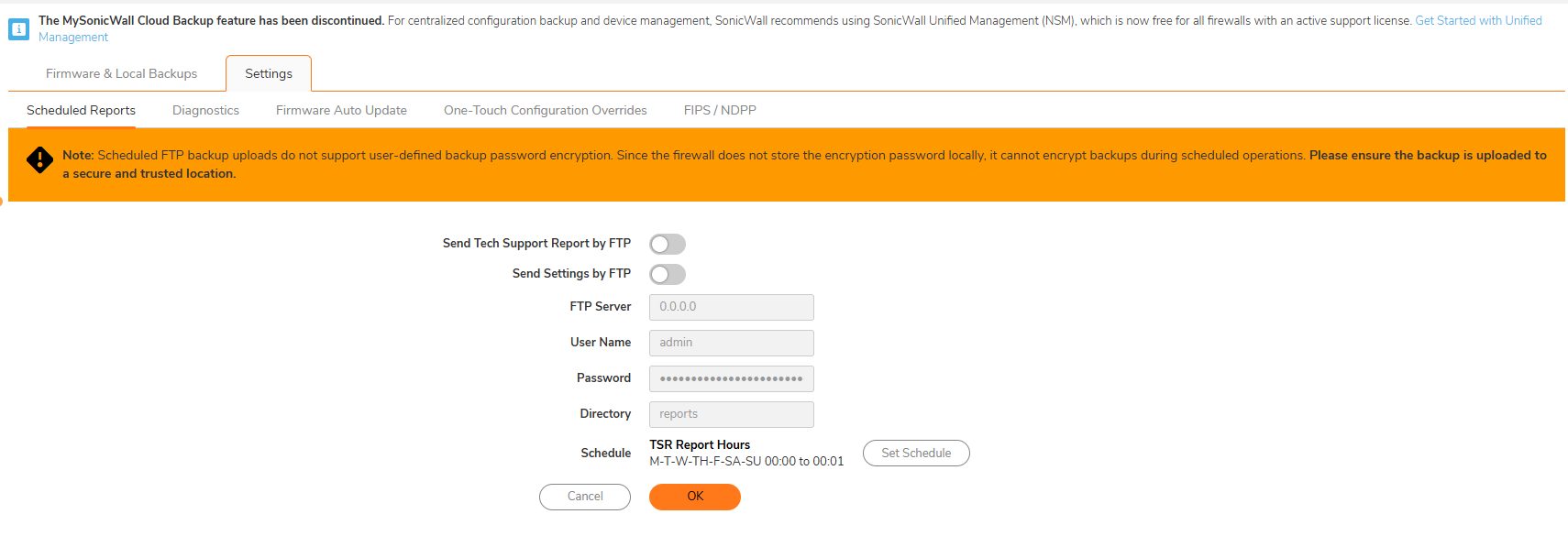
-
To send TSRs by FTP, select Send Tech Support Report by FTP. This option is not selected by default.
-
To send configuration settings by FTP, select Send Settings by FTP. This option is not selected by default.
-
When you select Send Tech Support Report by FTP or Send Settings by FTP, the server fields become available.
-
Enter the server’s IP address in the FTP Server field.
-
Enter the user name associated with the server in the User Name field.
-
Enter the password associated with the user name in the Password field.
-
Enter the directory where the reports are to be sent in the Directory field.
-
-
Click Set Schedule. The Settings dialog box appears.

The Schedule Name is TSR Report Hours and cannot be changed.
- Configure the schedule. For how to configure a schedule, see Scheduling Firmware Image Backups.
- Click Save.