SonicOS 8 Device Settings
Table of Contents
Exporting Settings
You can import an exported configuration file to restore settings, for example after you reset the firmware.
SonicOS supports exporting configuration settings as encrypted or unencrypted files. Encrypted export files use AES-256-GCM encryption to protect sensitive configuration data at rest and during transit.
This encryption feature is supported in SonicOS 8.2.3 and later versions.
To export configuration file from the firewall
- Navigate to Device | Settings > Firmware and Settings.
-
Click Import/Export Configuration > Export Configuration.

The Export Configuration dialog box appears.
You can export configuration settings as either of the following:
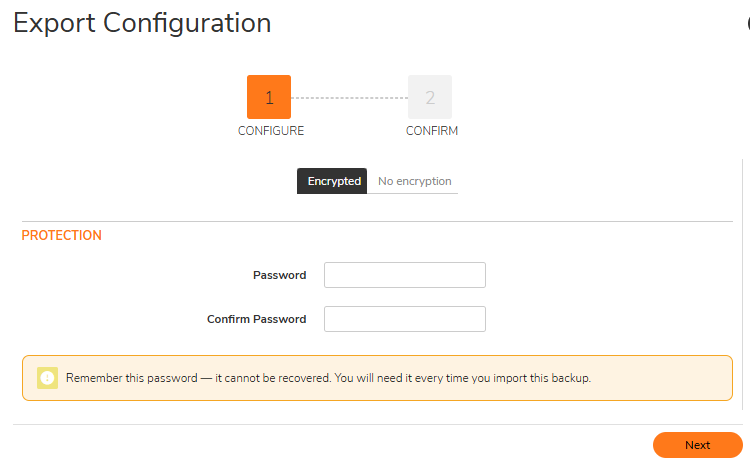
Encrypted configuration file
To export an encrypted configuration file
- In the Export Configuration dialog, select Encrypted.
-
In the Password field, enter an encryption password.
The password must comply with the configured password policy.
-
In the Confirm Password field, re-enter the password.
-
Click Next.
-
Review the export details and the warning message.
-
Click Export.
The encrypted configuration file is downloaded to your local system.
The encrypted configuration file is exported with an .epf file extension. The encryption password is not stored and cannot be recovered. Store the password in a secure location.
Unencrypted configuration file
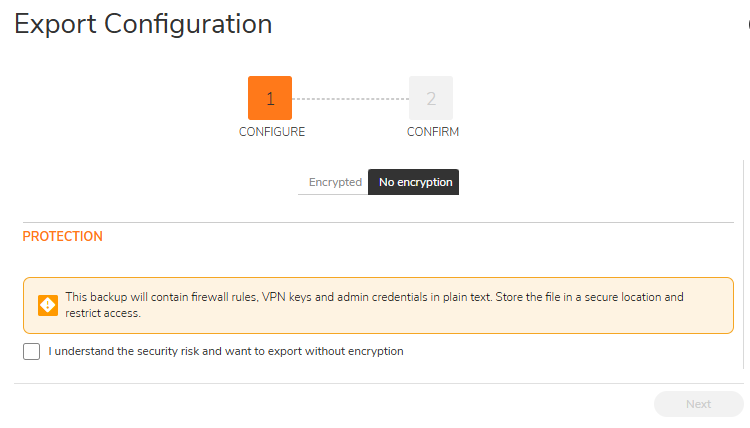
To export an unencrypted configuration file
- In the Export Configuration dialog, select No encryption.
-
Review the warning message.
-
Select the I understand the security risk and want to export without encryption check box.
-
Click Next.
-
Review the export details and click Export.
The unencrypted configuration file is downloaded to your local system.
The unencrypted configuration file is exported with an .exp file extension. Because it contains sensitive information in plain text, store the file securely and limit access to authorized personnel.