
SonicOS 8 Objects
Table of Contents
SaaS & AI Application Objects
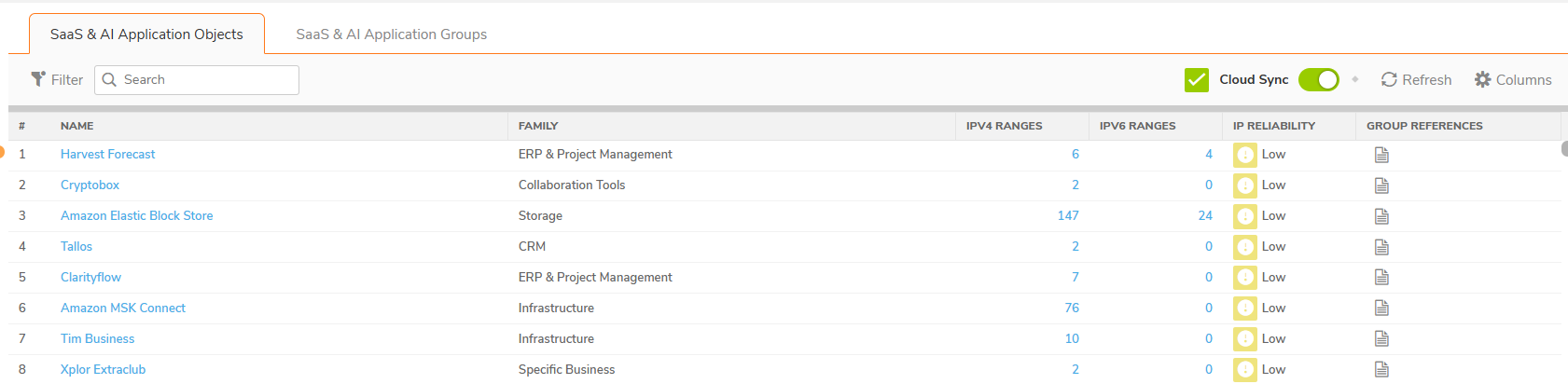
SaaS & AI Application Objects are read-only objects that represent individual SaaS & AI applications identified by their associated IP address ranges. These objects are automatically populated from the SonicWall-maintained cloud database when Cloud Sync is enabled. You cannot create, edit, or delete individual SaaS & AI Application Objects. The database synchronization process manages them.
Each SaaS & AI Application Object contains the following information:
- Application name
- Family category
- Associated IPv4 address ranges
- Associated IPv6 address ranges
- IP Reliability level
- Group reference count (number of SaaS & AI Application Groups that include this object)
SaaS & AI Application Objects are used as building blocks for creating SaaS & AI Application Groups. You select one or more application objects and add them to a group, which can then be referenced in Access Rules, Route Policies, and SD-WAN Rules.
- Viewing SaaS & AI Application Objects
- Filtering SaaS & AI Application Objects
- Customizing Table Columns
- Viewing Application Object Details
- Understanding IP Reliability Levels
Viewing SaaS & AI Application Objects
To view SaaS & AI Application Objects
Before you begin, make sure that Cloud Sync is turned on and that the firewall can reach the SonicWall cloud service.
Before you begin, make sure that Cloud Sync is turned on and that the firewall can reach the SonicWall cloud service.
- Navigate to OBJECT | Match Objects > SaaS & AI Applications.
- Click the SaaS & AI Application Objects tab.
-
If Cloud Sync is not already on, turn on the Cloud Sync toggle.
The firewall downloads the SaaS & AI Applications database from the SonicWall cloud service. When the download completes, the application objects appear in the SaaS & AI Application Objects tab.
Filtering SaaS & AI Application Objects
You can filter the displayed application objects to narrow the list.
To filter application objects
- On the SaaS & AI Application Objects tab, click Filter.
- Select filter criteria, for example, Family or IP Reliability.
The table displays only the applications that match the filter.
To search for an application
- In the Search field (magnifying glass icon), enter the application name or keyword.
The table displays the matching entries.
Customizing Table Columns
To customize the displayed columns
- At the top-right, click Columns.
- Select or clear the check boxes for the columns to show or hide.
The table updates to reflect your column preferences.
Viewing Application Object Details
To view details of a SaaS & AI Application Object
- Click the application name link in the table.
- Family: The family category of the application (for example: Storage).
- Description: A brief description of the application and its function (for example: "Amazon Elastic Block Store (Amazon EBS) is a block storage service designed for Amazon Elastic Compute Cloud (Amazon EC2).").
- IP Reliability: The confidence level of the IP-to-application mapping, displayed with a color-coded indicator icon and text label (High, Medium, Low, or Very Low).
The <Application Name> dialog box displays the following fields:
Understanding IP Reliability Levels
IP Reliability indicates the confidence level that the destination IP addresses downloaded from the SonicWall cloud service map uniquely and accurately to a specific SaaS or AI application. Because cloud services frequently share hosting infrastructure, content delivery networks (CDNs), or multi-tenant IP pools, IP Reliability helps administrators balance policy precision against application coverage.
| IP Reliability Level | Visual Indicator | Definition & Mapping Behavior | Recommended Administrative Use |
|---|---|---|---|
| High | Green icon | Dedicated & Authoritative: The IP address ranges are officially published and exclusively operated by the service provider (such as Microsoft 365, Amazon EC2, Google Cloud Platform, or Zoom). IP-to-application mapping is near-deterministic. | Recommended for all policy types, including Access Rules, Route Policies, and SD-WAN Rules where false positive matches must be avoided. |
| Medium | Yellow icon | Strongly Attributed: The IP address ranges are strongly associated with the application, but minor overlap or dynamic rotation across adjacent vendor services may occur. | Recommended for general routing and security policies when combined with High-reliability objects. |
| Low | Orange icon | Shared / Multi-Tenant Infrastructure: The application is hosted on multi-tenant cloud providers, edge proxies, or shared CDNs (such as Akamai, Cloudflare, or shared cloud edge pools) where destination IP addresses serve multiple unrelated services. | Use with caution in Route Policies or Security Bypass rules. Including Low-reliability objects maximizes application coverage but risks routing or classifying unrelated traffic destined for the same shared hosting provider. |
| Very Low | Red icon | Unverified / Insufficient Data: The database contains insufficient or provisional IP mappings for the application. In most cases, no dedicated CIDR subnets are available. | Not recommended for active policy enforcement. Objects at this level generally fail-open or will not match packet flows. |
- For SD-WAN and Routing Rules: Select High and Medium to ensure critical application traffic is directed over preferred WAN links without inadvertently redirecting traffic destined for other tenants on shared cloud infrastructure.
For Access Rules and Security Controls: If comprehensive application coverage is required, you may include Low reliability objects, but ensure complementary inspection (such as CFS or App Control) remains active to inspect ambiguous traffic flows.