
SonicOS 8 Users
Table of Contents
MFA Alerting for Remote Access Users
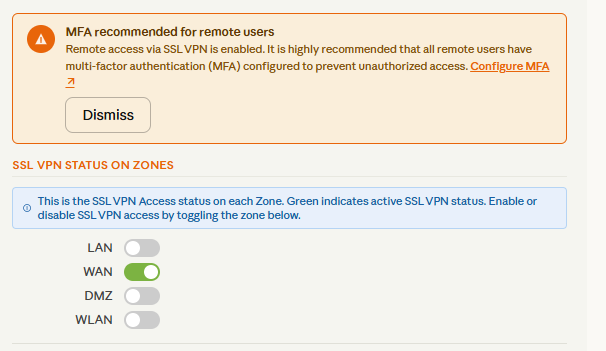
Beginning with SonicOS 8.2.3, the firewall generates persistent alerts if remote access users (SSLVPN or similar services) are configured without MFA. This helps administrators see potential security gaps.
-
The alert appears on the Server Settings page when remote access users/groups lack MFA.
-
The notification includes recommended remediation steps (for example, a link to configure 2FA for SSLVPN with TOTP).
-
Only administrators can see this warning (not other users).
-
If the administrator dismisses the alert, it reappears the next time the configuration page is accessed.
To review and remediate MFA alerts
-
Navigate to NETWORK | SSLVPN > Server Settings.
If remote access users are configured without MFA, a warning banner displays with:
A list of affected users/groups.
A Configure MFA link that navigates to the MFA settings page.
A Dismiss option (alert reappears on next access).
The alert is persistent by design and cannot be permanently suppressed, so administrators remain aware of MFA coverage gaps.
- To configure MFA for SSLVPN users, refer to the steps in the knowledge base: How do I configure 2FA for SSL VPN with TOTP.