
Layer 3 vs. Layer 4 vs. Layer 7 Firewalls: Where Do Virtual Firewalls Fit In?

A practical guide for security teams designing firewall architecture for cloud, hybrid, and virtualized environments.
As applications move from traditional data centers to virtualized and cloud-native environments, the role of firewalls has evolved significantly. Security teams today no longer protect a simple network perimeter; they now secure east-west traffic, cloud workloads, containers, and distributed applications.
This evolution has produced distinct firewall types that operate at different layers of the OSI model. Understanding the differences between Layer 3, Layer 4, and Layer 7 firewalls is essential for designing an effective security architecture and for determining where virtual firewalls belong in that design.
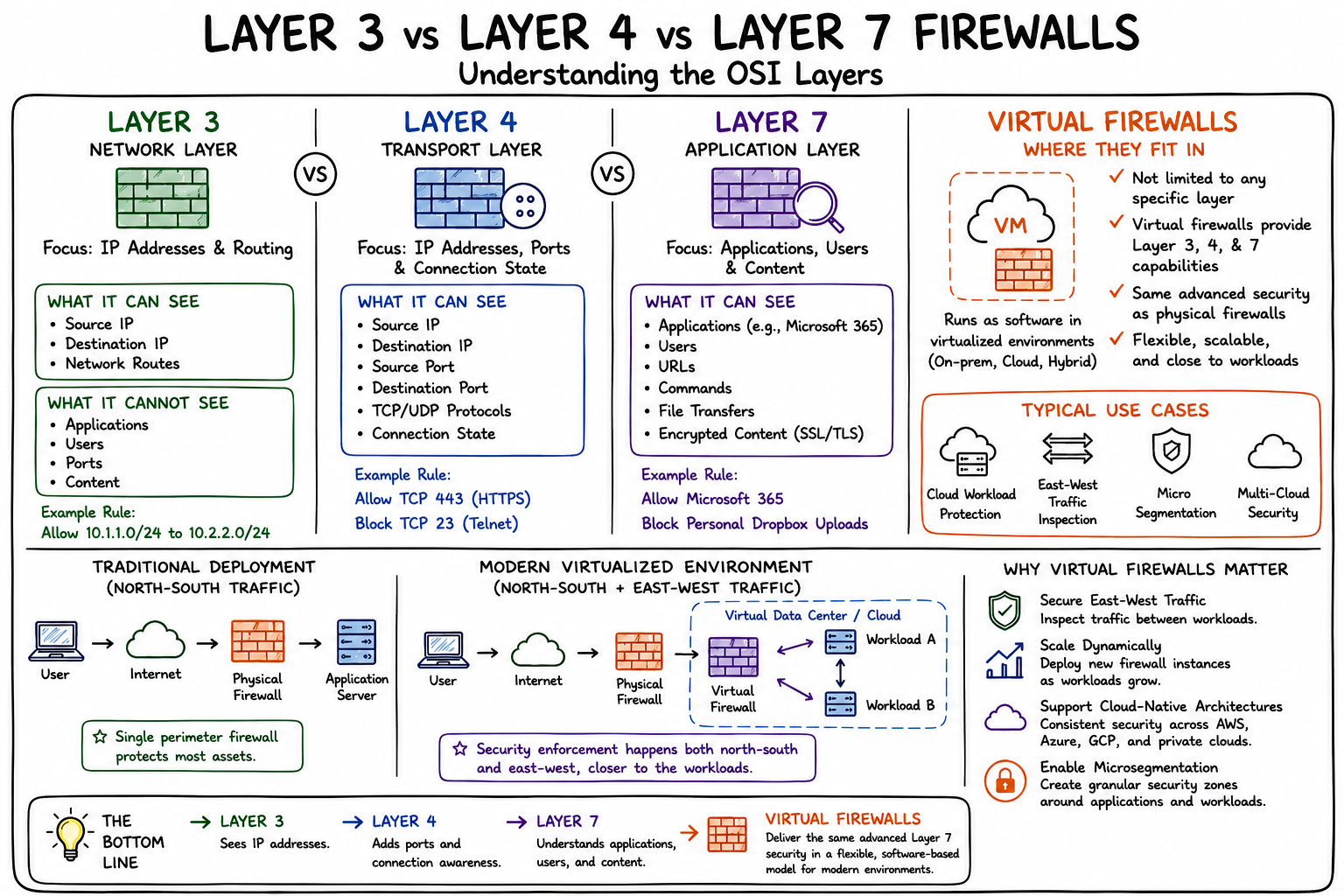
Understanding Firewall Layers
Layer 3 Firewall: Network-Level Control
A Layer 3 firewall operates at the Network Layer of the OSI model. Its primary function is to inspect and control traffic based on IP addresses and routing information.
Typical decisions include:
- Allow traffic from 10.1.1.0/24 to 10.2.2.0/24
- Block traffic from specific source or destination IP addresses
- Enforce network segmentation policies
What a Layer 3 firewall can see:
- Source IP address
- Destination IP address
- Network routes
What a Layer 3 firewall cannot see:
- Applications
- Users
- URLs or application content
Layer 3 firewalls are fast and efficient but provide limited visibility into the actual application generating the traffic.
Layer 4 Firewall: Transport-Level Awareness
Layer 4 firewalls add visibility into TCP and UDP ports and connection states. Instead of simply allowing traffic between two IP addresses, administrators can create rules such as:
- Allow HTTPS traffic (TCP 443)
- Allow SSH access (TCP 22)
- Block Telnet (TCP 23)
Most stateful firewalls operate at Layer 4 by tracking session information and ensuring that packets belong to legitimate established connections.
What a Layer 4 firewall can see:
- Source and destination IP
- Source and destination port
- TCP/UDP protocols
- Session state
However, Layer 4 firewalls still cannot identify the actual application behind the traffic. For example, both Microsoft Teams and a malicious application may use HTTPS over TCP port 443. To a Layer 4 firewall, they appear identical.
Layer 7 Firewall: Application-Level Intelligence
Layer 7 firewalls operate at the Application Layer and understand the actual applications and content being transmitted. Instead of simply identifying TCP 443 traffic, a Layer 7 firewall can distinguish between Microsoft 365, Salesforce, Zoom, Dropbox, YouTube, and unknown or malicious applications.
It can also inspect:
- URLs and user identities
- Application commands and file transfers
- API traffic
- SSL/TLS encrypted traffic (with decryption)
Typical policies include:
- Allow Microsoft 365
- Block personal Dropbox uploads
- Restrict social media during business hours
- Prevent file uploads containing sensitive data
Benefits include application visibility, user-based access control, advanced threat protection, deep packet inspection, and Zero Trust enforcement. Modern next-generation firewalls (NGFWs) primarily operate at Layer 7 while retaining Layer 3 and Layer 4 capabilities.
Comparing Layer 3, Layer 4, and Layer 7 Firewalls
| Capability | Layer 3 | Layer 4 | Layer 7 |
| IP-based filtering | Yes | Yes | Yes |
| Port-based filtering | No | Yes | Yes |
| Stateful inspection | Limited | Yes | Yes |
| Application identification | No | No | Yes |
| URL filtering | No | No | Yes |
| User awareness | No | No | Yes |
| SSL/TLS inspection | No | No | Yes |
| Threat prevention | Limited | Limited | Yes |
| East-west traffic control | No | Limited | Yes |
| Zero Trust enforcement | No | No | Yes |
Figure 1: Firewall capabilities across OSI layers, from basic IP filtering to full application-layer intelligence.
Where Do Virtual Firewalls Fit In?
A common misconception is that virtual firewalls represent a separate firewall category. In reality, "virtual" describes the deployment model, not the inspection layer. A virtual firewall can provide Layer 3, Layer 4, and Layer 7 security capabilities just like a physical firewall. The difference is that it runs as software inside a virtualized environment rather than on dedicated hardware.
Physical Firewall
Traditionally deployed as an appliance at the network edge. Typical use cases:
- Internet perimeter security
- Branch office security
- Campus networks
Virtual Firewall
Deployed as a virtual machine within VMware ESXi, Microsoft Hyper-V, Proxmox, KVM, or public clouds such as AWS and Azure. Typical use cases:
- Cloud workload protection
- East-west traffic inspection
- Microsegmentation
- Virtual data centers
- Multi-cloud environments
Why Virtual Firewalls Are Becoming Essential
Modern applications rarely reside behind a single perimeter firewall. Organizations now operate hybrid cloud environments, multi-cloud deployments, virtualized data centers, Kubernetes clusters, and distributed applications. As traffic increasingly flows between workloads rather than through a central internet gateway, security controls must move closer to the applications themselves.
Virtual firewalls enable organizations to:
Secure East-West Traffic
Inspect traffic between virtual machines and workloads inside the data center, a capability that traditional perimeter firewalls are not positioned to provide.
Scale Dynamically
Deploy new firewall instances as workloads grow. Unlike physical appliances, virtual firewalls can be provisioned on demand, reducing both lead time and capital expense.
Support Cloud-Native Architectures
Protect workloads across AWS, Azure, and private clouds using consistent security policies. SonicWall virtual firewalls extend the same NGFW capabilities available on physical appliances to cloud environments.
Enable Microsegmentation
Create granular security zones around individual applications and workloads. This limits lateral movement in the event of a breach and supports Zero Trust network access models.
Frequently Asked Questions
What is the difference between a Layer 3 and Layer 7 firewall?
A Layer 3 firewall filters traffic based on IP addresses only. A Layer 7 firewall understands the application generating the traffic, the identity of the user, and the content being transferred. Layer 7 firewalls provide significantly greater visibility and control.
Is a virtual firewall as secure as a physical firewall?
Yes, when properly configured. A virtual firewall running on a capable hypervisor can enforce the same Layer 7 policies, deep packet inspection, and threat prevention as a physical appliance. Performance scales with allocated compute resources.
Do virtual firewalls support SSL/TLS inspection?
Yes. SonicWall virtual firewalls support full SSL/TLS decryption and inspection, enabling visibility into encrypted traffic that would otherwise bypass security controls.
What OSI layers do next-generation firewalls inspect?
NGFWs inspect traffic at Layers 3, 4, and 7 simultaneously. This provides IP and port-based filtering as well as application identification, user awareness, and advanced threat detection in a single platform.
Where do virtual firewalls fit in a Zero Trust architecture?
Virtual firewalls are a foundational component of Zero Trust architecture. They enforce microsegmentation, apply least-privilege access policies between workloads, and provide continuous inspection of east-west traffic, all critical requirements for Zero Trust environments.
Conclusion
Layer 3, Layer 4, and Layer 7 firewalls differ based on how deeply they inspect traffic. Layer 3 focuses on IP addresses. Layer 4 adds ports and session awareness. Layer 7 understands applications, users, and content.
Virtual firewalls are not limited to any specific layer. They are software-based deployments that can provide the same advanced Layer 7 security capabilities as physical next-generation firewalls, while offering the flexibility and scalability required for modern virtualized and cloud environments.
As organizations continue to adopt hybrid and multi-cloud architectures, virtual firewalls are becoming a critical component for securing workloads, enforcing segmentation, and maintaining consistent security policies across increasingly distributed infrastructures.
| SonicWall NSv virtual firewalls deliver full NGFW capabilities, including application identification, SSL/TLS decryption, and advanced threat prevention, across VMware, Hyper-V, AWS, Azure, and other platforms. Learn more at sonicwall.com. |
Learn More
Visit SonicWall NSv Series | Advanced Virtual Firewall Solutions
Try it: Start Free Trial
Share This Article

An Article By
An Article By
Lokesh Kannaiyan
Lokesh Kannaiyan

